Govern access
This page explains how Fundamentum organizes your resources and controls who can access them: the organization hierarchy, licenses for serving your own customers, roles and permissions, and identities for your integrations.
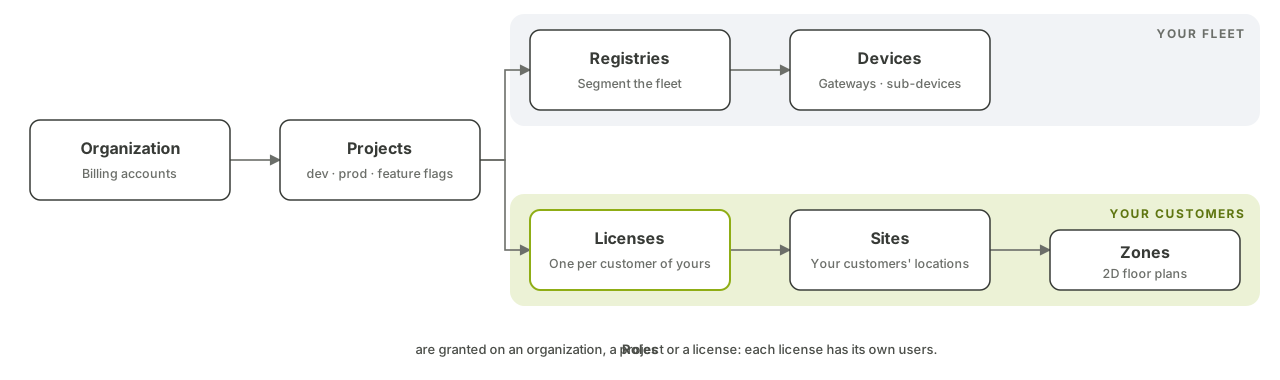
Your fleet: organizations, projects, registries
- An organization is the top of the hierarchy: your company. It holds your projects and your billing accounts.
- A project is the main unit of isolation. Almost everything belongs to a project: registries and devices, topics, functions, alert rules, Insight instances. Teams typically run one project for development and one for production, and can put them on separate billing accounts. Optional platform features are switched on per project.
- Registries segment the fleet within a project, and hold the devices, including gateways and their sub-devices. See Onboard and secure devices.
Your customers: licenses, sites, zones
When you build a product on Fundamentum and sell it to your own customers, licenses let you give each of them access to their part of your project, and nothing else.
- A license typically represents one of your customers. Each project defines its own license types and the options their licenses carry (for example a capacity or an address), so a license can hold the commercial terms of your offer.
- A license has its own users, invited as license managers or viewers. They do not need access to the rest of your project.
- Sites are your customers' locations, under a license, with an optional address and coordinates.
- Zones subdivide a site (a floor, a parking level, a room) and can be nested to any depth. A zone can be drawn on a map, located by an address, or shown on a 2D floor plan.
This is how SCMS and Spatium serve their customers on Fundamentum: see In production.
Roles and permissions
Access is controlled by role-based access control (RBAC).
- A permission allows an action (list, show, create, update, delete, and a few specific ones such as invoking a function) on a kind of resource.
- A role is a named set of permissions.
- A role is granted on an organization, a project, a license or a site, and applies only there.
- People get roles through email invitations: the invitee signs in, and the role is assigned. Removing the role is how you revoke access.
Every Public API call is checked against the caller's roles, and the Hub shows only what the user is allowed to see.
Identities for your integrations
- Service accounts are non-human identities belonging to a project, for your back-end systems and scripts. You give them roles like any user, and issue them tokens (API keys) to call the Public API.
- OAuth clients register your own web, mobile or server applications with Connect, so their users sign in with their Fundamentum account. Each application's sign-in page can be branded with its own logo and background.
Sign-in and audit
- Single sign-on with Google or Microsoft. SSO can be enforced per project, per license or per site, so your identity provider's MFA and password policies apply.
- Audit log: every call to the Public API is recorded, along with sign-ins, failed sign-ins, sign-outs and password resets.
- Public status page, to follow the platform's health and subscribe to incident notifications. See Security and trust.
Go further
- Connect: access and customers: the governance guides.
- Licenses: serve your own customers
- Roles and permissions
- Alerts
- Authentication: sign in and get a token.
- The fun CLI
- Public API