Cloud functions
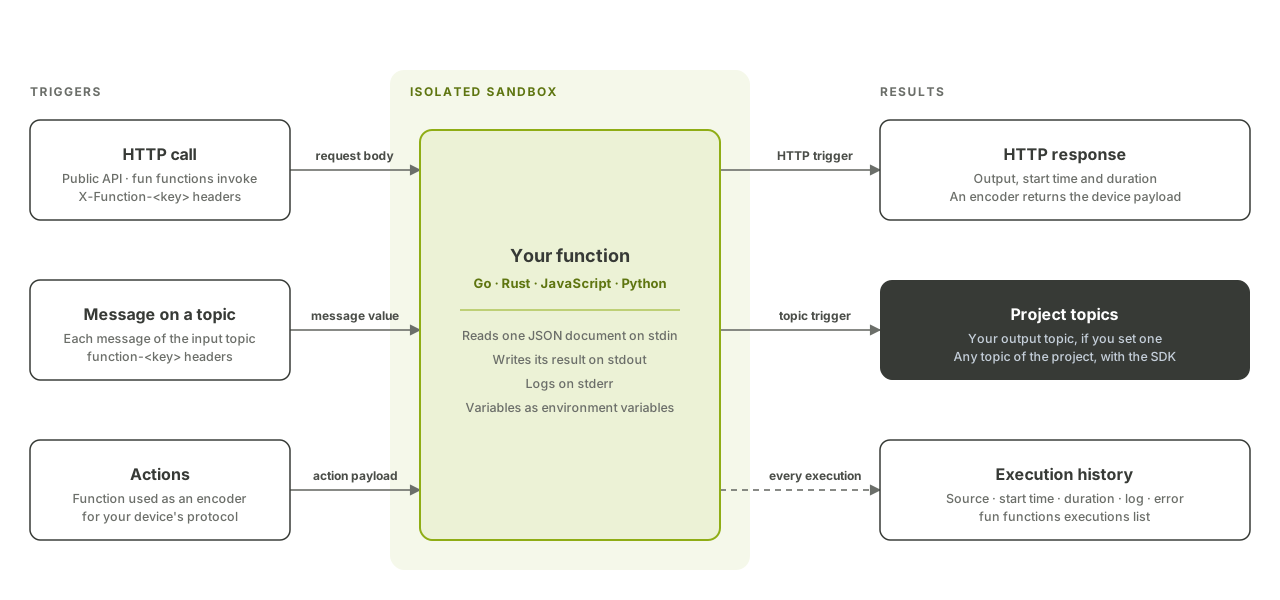
Cloud functions run your own code inside Fundamentum, on an HTTP call or on every message of a topic, without servers to manage. This page shows you how to write a function, deploy it with the fun CLI, trigger it, and read its execution history.
What you can do with them
- Decode proprietary payloads: turn a device's binary frame into JSON your systems understand.
- Enrich: add context to a message before it reaches a connector or Insight.
- Route: read one topic and write the result to another.
- Translate actions: reuse a function as an encoder that converts platform actions into your device's protocol (see Actions and custom encoders).
You write functions in Go, Rust, JavaScript or Python. Each execution runs in an isolated sandbox, and every execution is recorded with its logs and errors.
How a function runs
A function is a program that reads one JSON document on standard input and writes its result on standard output:
{
  "input": "<base64 of the request body or topic message>",
  "context": {"function_id": "<function-id>", "project_id": 1234},
  "metadata": {"<key>": "<base64 value>"}
}
inputis the raw payload, base64-encoded.metadataholds the values of theX-Function-<key>HTTP headers, or of thefunction-<key>message headers, also base64-encoded.- Anything written on standard error is kept as the execution log.
- Function variables you define are available as environment variables.
| Trigger | Input | Where the output goes |
|---|---|---|
| HTTP: a call to the Public API | The request body, as is | The API response |
| Topic: a message on an input topic | The message value | The output topic, if you set one |
A topic-triggered function can run more than once for the same message; make it idempotent. By default a function processes one execution at a time and queues the others; set scaling.pool_size (greater than 1) to run several in parallel.
The runtime, build targets and SDK are described in Runtime and SDK.
Before you begin
- The
funCLI installed and signed in (see Authentication). - Your project ID and, for topic triggers, the IDs of the input and output topics.
- The toolchain for your language, as listed on the Runtime and SDK page.
- The
functionpermissions you need (store,upload,invoke,monitor…; see Roles and permissions).
1. Write the function
This Go function decodes a two-byte temperature frame and returns JSON. It uses only the standard library:
package main

import (
	"encoding/binary"
	"encoding/json"
	"fmt"
	"os"
)

type request struct {
	Input    []byte            `json:"input"` // base64 in the JSON, decoded by encoding/json
	Metadata map[string][]byte `json:"metadata"`
}

func main() {
	var req request
	if err := json.NewDecoder(os.Stdin).Decode(&req); err != nil || len(req.Input) < 2 {
		fmt.Fprintln(os.Stderr, "invalid input")
		os.Exit(1)
	}
	tenths := int16(binary.BigEndian.Uint16(req.Input[:2]))
	json.NewEncoder(os.Stdout).Encode(map[string]float64{"temperature": float64(tenths) / 10})
}
Build it for the function runtime with the command given on the Runtime and SDK page.
2. Create the function
fun functions new temp-decoder --project <project-id> --language go \
  --description "Decode temperature frames" \
  --connector <input-topic-id>:<output-topic-id> \
  --variable UNIT=celsius
temp-decoder is a local name the CLI keeps for you, so later commands don't need the IDs. Leave out --connector for a function triggered by HTTP only. Use --ask to be prompted for missing values. Connectors that would form a cycle between topics are rejected.
3. Upload the code
fun functions upload temp-decoder <path-to-compiled-function>
Each upload replaces the previous code. Files can be up to 1 GiB.
4. Invoke it over HTTP
printf '\000\347' > frame.bin
fun functions invoke -n temp-decoder -i frame.bin
The raw request, with optional metadata headers:
POST https://api.fundamentum-iot.com/v2/projects/<project-id>/functions/<function-id>:invoke
Authorization: Bearer $TOKEN
X-Function-Device: <serial-number>

<request body>
The response gives the start time, the duration in seconds and the output. format is json when the output is valid JSON, unicode for other text, and base64 for binary output:
{
  "status": "success",
  "data": {
    "started_at": "Thu, 22 Oct 2026 14:30:00 UTC",
    "execution_time": 0.004,
    "output": {"format": "json", "value": {"temperature": 23.1}}
  }
}
| Status | Meaning |
|---|---|
404 |
The function does not exist in this project |
408 |
The execution reached its timeout |
424 |
No code has been uploaded yet |
5. Check the execution history
fun functions executions list -n temp-decoder
Each execution shows its source (http or pubsub), started_at, execution_time, log and error. Executions are kept for 7 days.
Manage functions
| Task | Command |
|---|---|
| List a project's functions | fun functions list --project <project-id> |
| Edit the configuration (timeouts, variables, connectors, scaling) | fun functions edit temp-decoder |
| Give an existing function a local name | fun functions names add temp-decoder --project <project-id> --function <function-id> |
| Call the API directly | fun api v2 functions <operation> --project-id <project-id> |
What's next
- API reference in Swagger UI: Functions
- Actions and custom encoders: use a function as an encoder for your devices.
- Runtime and SDK: runtime contract, build targets, SDK.
- Connectors: deliver the function's output topic to your systems.