Shelf devices and provisioning keys
Shelf devices let you register devices at the factory, before you know which customer or registry they'll join, and assign them to a registry at installation. This page walks you through the full flow: provisioning key, factory registration, provisioning into a registry and the device's first connection.
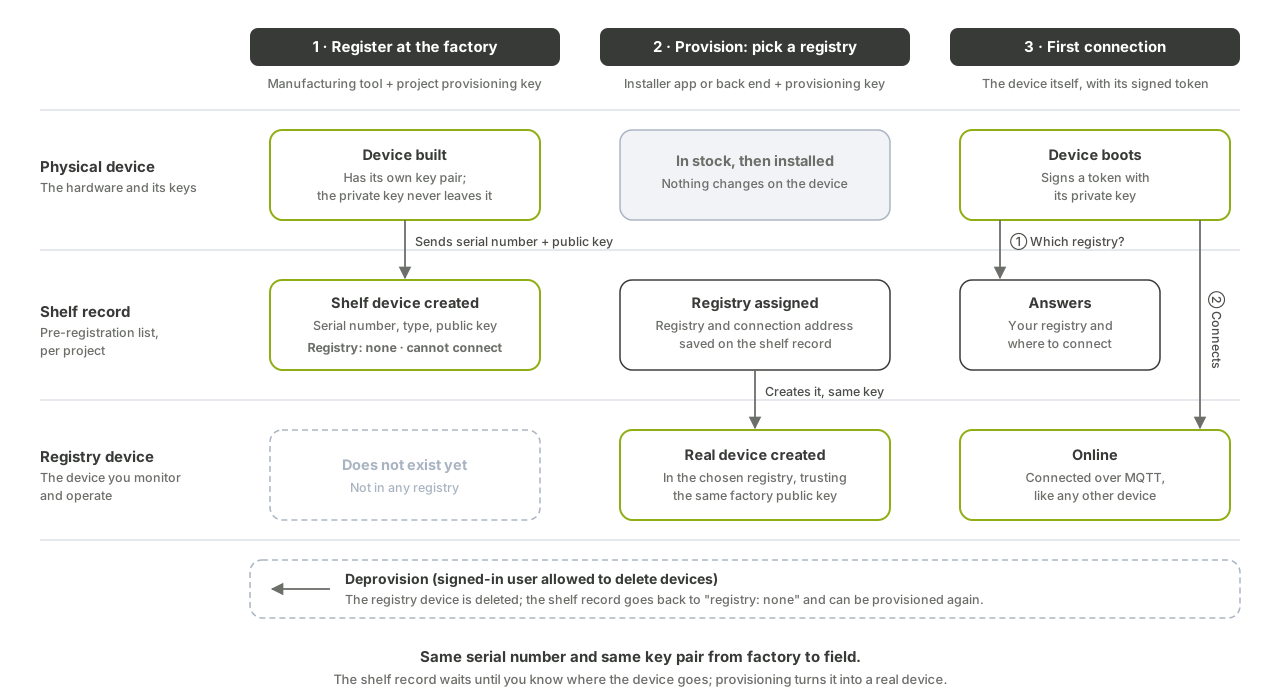
How it works
A shelf device is created with its serial number and its credentials (public key and algorithm). It stays unprovisioned, and can't connect, until someone assigns it to a registry. The device itself only knows its serial number, project, region and asset type. At boot, it asks the platform which registry it belongs to, and connects once it gets an answer.
            store                    provision(registry_id)
  (none) ─────────▶ unprovisioned ─────────────────────────▶ provisioned
                      ▲      │                                    │
                      │      └─ delete ─▶ (none)                  │
                      └──────────────── deprovision ◀─────────────┘
Each step uses a different credential:
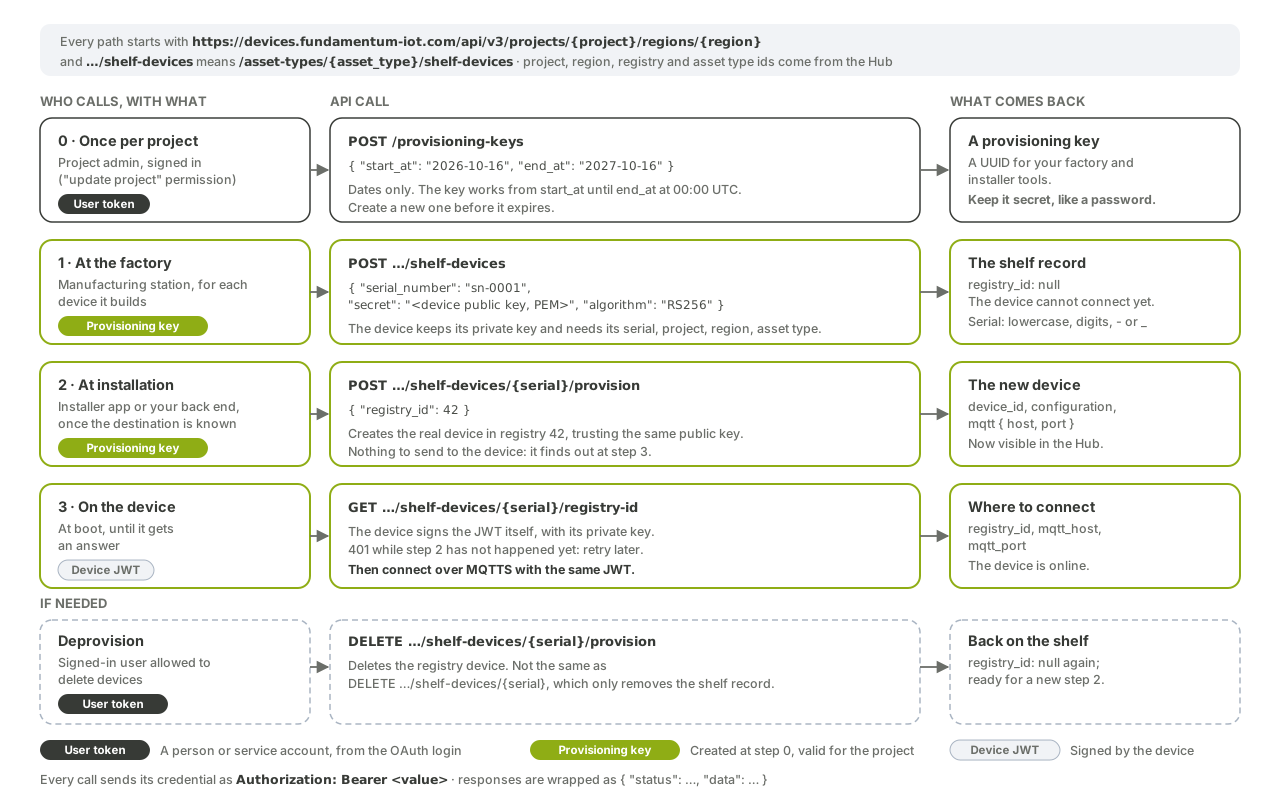
| Step | Who calls | Credential (Authorization: Bearer) |
|---|---|---|
| Create a provisioning key | A project administrator | OAuth user token with permission to update the project |
| Register the shelf device | Factory tooling | Provisioning key |
| Provision into a registry | Installer tool or integration | Provisioning key |
| Look up the registry | The device | Device JWT signed with its private key |
| Deprovision | An operator or integration | OAuth token with permission to delete devices |
All paths below are relative to https://devices.fundamentum-iot.com/api/v3/projects/<project-id>/regions/1.
Before you begin
- You're a project user with permission to update the project. See Authentication.
- You know the
asset_type_idof your devices. See Self-provisioning to find it. - Each device has an RSA key pair. The private key stays on the device.
1. Create a provisioning key
A provisioning key authorizes shelf-device operations for one project. It's active from start_at (inclusive) until end_at (exclusive). Dates use YYYY-MM-DD and are read as midnight UTC.
curl -s -X POST https://devices.fundamentum-iot.com/api/v3/projects/<project-id>/regions/1/provisioning-keys \
  -H "Authorization: Bearer $TOKEN" \
  -H "Content-Type: application/json" \
  -d '{"start_at": "2026-10-16", "end_at": "2027-10-16"}'
The response contains the key (a UUID). Store it in your factory tooling's secret store.
| Operation | Call |
|---|---|
| List active keys | GET /provisioning-keys |
| Get one key | GET /provisioning-keys/<key> |
| Delete a key | DELETE /provisioning-keys/<key> |
2. Register the device at the factory
For each device, send its serial number and public key:
curl -s -X POST https://devices.fundamentum-iot.com/api/v3/projects/<project-id>/regions/1/asset-types/<asset-type-id>/shelf-devices \
  -H "Authorization: Bearer <provisioning-key>" \
  -H "Content-Type: application/json" \
  -d '{
    "serial_number": "<serial-number>",
    "algorithm": "RS256",
    "secret": "-----BEGIN PUBLIC KEY-----\n...\n-----END PUBLIC KEY-----"
  }'
The serial number must already be lowercase and contain only letters, digits, _ and -. A shelf device is identified by its project, asset type and serial number. The response returns the shelf device (id, project_id, serial_number, secret, algorithm and timestamps).
3. Provision the device into a registry
At installation, once you know the destination, assign the device to a registry:
curl -s -X POST https://devices.fundamentum-iot.com/api/v3/projects/<project-id>/regions/1/asset-types/<asset-type-id>/shelf-devices/<serial-number>/provision \
  -H "Authorization: Bearer <provisioning-key>" \
  -H "Content-Type: application/json" \
  -d '{"registry_id": <registry-id>}'
The response returns the device_id, the device configuration and the mqtt connection details (host, port, client_id). Nothing is pushed to the device: it learns its registry at the next step. Provisioning a shelf device that is already provisioned returns 422; deprovision it first.
4. Let the device look up its registry
The device signs a JWT with its private key (see Connect over MQTTS) and asks for its registry:
curl -s https://devices.fundamentum-iot.com/api/v3/projects/<project-id>/regions/1/asset-types/<asset-type-id>/shelf-devices/<serial-number>/registry-id \
  -H "Authorization: Bearer <device-jwt>"
| Status | Meaning | What the device does |
|---|---|---|
200 |
Returns registry_id, mqtt_host and mqtt_port. |
Connects over MQTTS with the same key. |
401 |
The device isn't provisioned yet. | Waits, then retries. |
The MCU library implements this lookup in edge_provisioning_get_registration.
Manage shelf devices
| Task | Call | Credential |
|---|---|---|
| Get a shelf device | GET /asset-types/<asset-type-id>/shelf-devices/<serial-number> |
Provisioning key |
| Deprovision, so it can move to another registry | DELETE /asset-types/<asset-type-id>/shelf-devices/<serial-number>/provision |
OAuth token with permission to delete devices |
| Delete the shelf record | DELETE /asset-types/<asset-type-id>/shelf-devices/<serial-number> |
Provisioning key |
Deprovisioning deletes the device from its registry and returns the shelf device to the unprovisioned state. Deleting the shelf record only removes the shelf record, so deprovision a provisioned device first.
What's next
- API reference in Swagger UI: Devices API v3
- Connect over MQTTS once the device has its registry.
- See the Devices API v3 reference for the shelf-device and provisioning-key schemas.