Actions and custom encoders
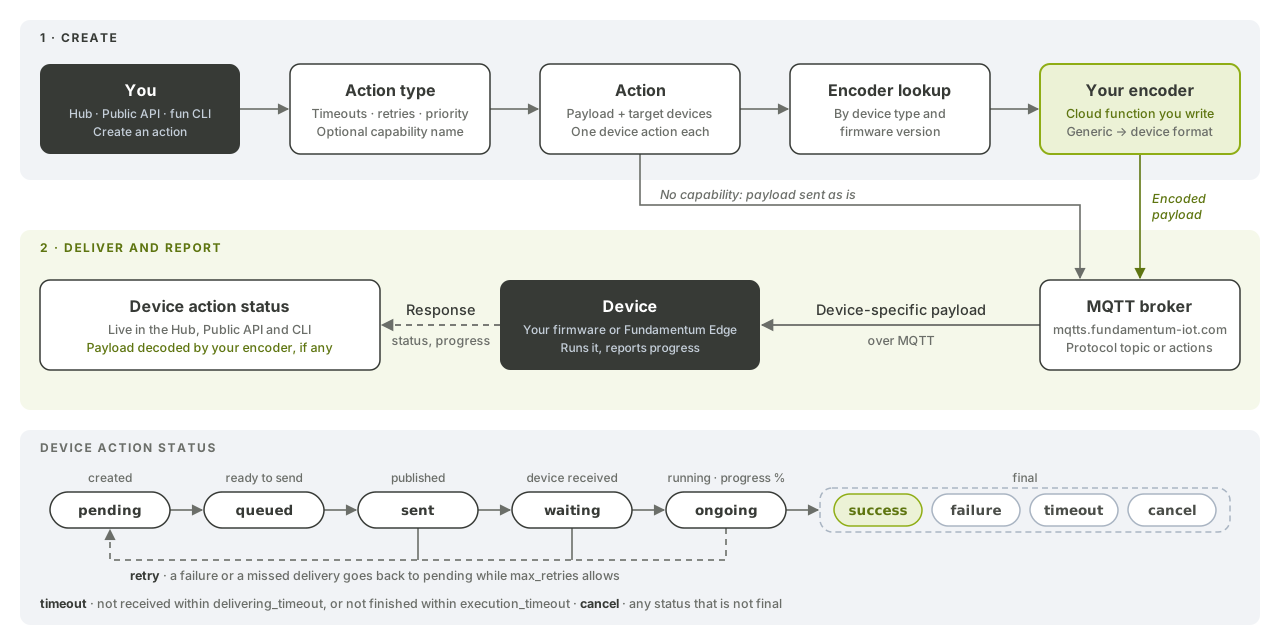
Actions are your own operations on devices: you define how long a device has to receive and run them, how many times to retry and how urgent they are, and Fundamentum tracks each one device by device. With capabilities and encoders, one action works across device types and firmware versions that each expect a different format.
Before you begin
- You have the
funCLI logged in, or a token for the Public API. - You know your
<project-id>and the IDs of the target devices. - Your devices receive and acknowledge actions. The Linux daemon delivers them to your code and sends status updates back. See MQTT topics and message formats for devices without Edge.
- To write an encoder, you know how to deploy a cloud function.
How it works
- An action type is a template: a
name, a numerictypeyour devices recognize, and the delivery rules. - An action sends one payload to one or more devices. Fundamentum creates a device action per device and tracks its status.
- Optionally, the action type names a capability. Fundamentum then looks up, for each device's type and firmware version, the encoder that translates the payload, and the protocol (device topic) to deliver it on.
A device action goes through these statuses:
pending → queued → sent → waiting / ongoing → success | failure | timeout
A device action can also end as cancel, and retry marks one that's being sent again. success, failure, timeout and cancel are final. Each device action also records sent_at, received_at, started_at, done_at, its progression and its delivery and execution attempt counts. The action itself is scheduled, progressing or done, and its progression is the average over its devices.
1. Create an action type
fun api v1 action store-action-type --project-id <project-id> --body '{
  "project_id": <project-id>,
  "name": "Rotate logs",
  "type": 42,
  "delivering_timeout": 120,
  "execution_timeout": 300,
  "max_retries": 3,
  "priority": 1
}'
| Field | Meaning |
|---|---|
delivering_timeout |
Seconds for the device to receive the action. Past it, the action is retried, then marked timeout |
execution_timeout |
Seconds for the device to finish once it has started |
max_retries |
How many times a failed or undelivered action is sent again (0 to 1000) |
priority |
Lower runs first: priority 1 is sent before priority 10 |
capability_name |
Optional. Set it only when the action goes through an encoder (step 5) |
Fundamentum also provides generic action types shared by every project. List them with fun api v1 action list-action-types --project-id <project-id>.
2. Send an action
payload is base64-encoded. devices lists device IDs:
fun api v1 action store-action --project-id <project-id> --body '{
  "action_type_id": <action-type-id>,
  "devices": [101, 102, 103],
  "description": "Weekly log rotation",
  "payload": "eyJrZWVwIjogN30="
}'
To schedule it, add "is_scheduled": true with activate_at, end_at or a cron expression. To target devices of one registry, use store-action-by-registry with --registry-id.
3. Track it end to end
fun api v1 action get-action --project-id <project-id> --action-id <action-id>
fun api v1 action get-device-actions --project-id <project-id> --device-id <device-id>
fun api v1 action get-device-actions-by-registry --project-id <project-id> --registry-id <registry-id>
In the Hub, the action's page and the device's Actions tab update live as devices report progress.
4. Cancel or retry
Actions can't be deleted, only cancelled. You act on all devices of an action, or on one:
fun api v1 action cancel-action --project-id <project-id> --action-id <action-id>
fun api v1 action retry-device-action --project-id <project-id> --device-id <device-id> --action-id <action-id>
5. Use one action across device types: capabilities and encoders
-
Create a capability, the name of what devices can do. Names are 1 to 64 characters: letters, digits,
.,-and_, starting with a letter or digit.fun api v1 capability store-capability --project-id <project-id> \ --body '{"name": "device.restart", "description": "Restart the device"}' -
Pick a protocol. It defines the device topic the encoded payload is published on. Protocols are platform-wide:
fun api v1 capability get-encoder-protocols --project-id <project-id> -
Deploy your encoder function (see Cloud functions), then register it as an encoder:
fun api v1 capability store-encoder --project-id <project-id> \ --body '{"name": "Model B restart encoder", "protocol_id": <protocol-id>, "function_id": "<function-id>", "parameters": {}}' -
Link the capability to the encoder for a device type, and optionally a firmware version. A link for a specific
version_idwins over a link for all versions:fun api v1 capability store-capability-encoder --project-id <project-id> --capability-id <capability-id> \ --body '{"encoder_id": <encoder-id>, "device_type_id": <device-type-id>, "version_id": <version-id>}' -
Create an action type with
"capability_name": "device.restart"and send actions as in step 2.
Writing an encoder
Your encoder is called in two modes:
encode, when the action is created, then each time it is sent to a device, retries included. The input is the action payload. Return what the device must receive. If your encoder fails when the action is created, the action is rejected.decode, each time the device responds. The input is thepayloadof the device's response. Return it in the format you want to read it in.
The status, message and progress of the device action always come from the device's response. decode only translates its payload; if it fails, the status still applies and the device action records the decoding error.
The call carries four metadata values: Mode (encode or decode), Capability, Action-Id and Device-Ids (comma-separated). On a groupable protocol, one call can cover several devices that share the same encoder. The function writes one JSON document to stdout, in both modes:
{"status": "success", "data_type": "json", "data": {"command": "restart", "delay_s": 5}}
Use "data_type": "binary" with base64 data for binary payloads, or {"status": "error", "error": "..."} to fail. See Cloud functions: runtime and SDK for reading input and metadata.
What's next
- API reference in Swagger UI: Action, Capability
- Firmware updates (OTA)
- File transfers
- Cloud functions
- Public API