Send telemetry, states and heartbeats
This page shows you how a connected device publishes its three kinds of data: telemetry, states and heartbeats. It gives the topic and a payload example for each one.
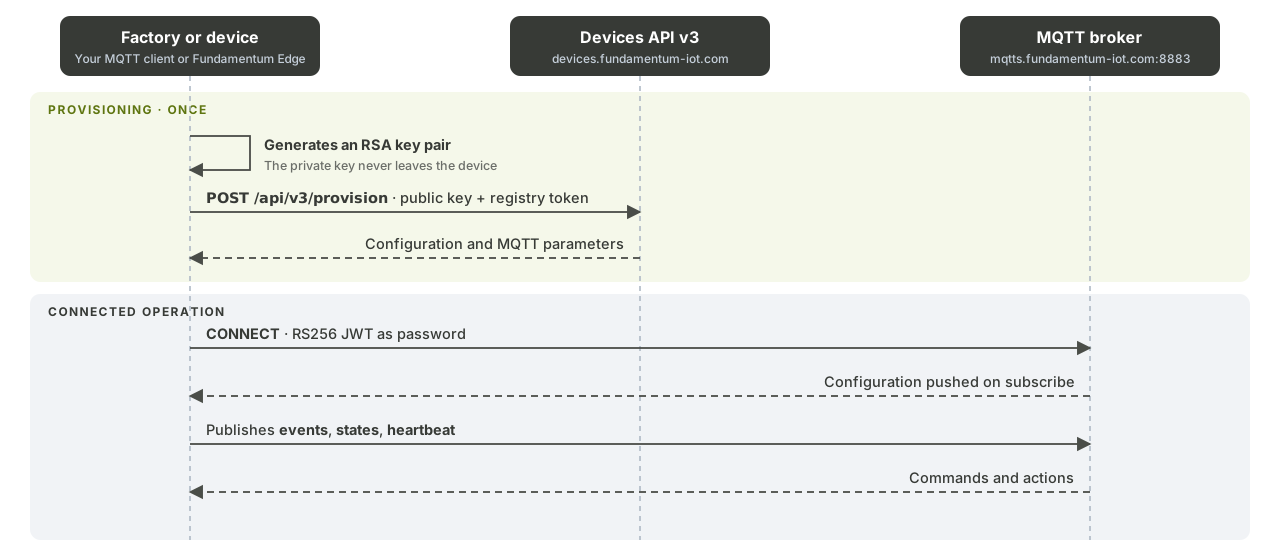
Before you begin
- The device is connected over MQTTS. See Connect over MQTTS.
- In the examples,
<prefix>stands forregistries/<registry-id>/devices/<serial-number>. The Mosquitto examples reuse the connection options from Connect over MQTTS.
| Data | Topic | Format | What the platform does |
|---|---|---|---|
| Telemetry | <prefix>/events or <prefix>/events/<name> |
Any (JSON, binary, text) | Forwards it unchanged to the registry's topics |
| States | <prefix>/states |
Fundamentum JSON | Stores the device's latest values |
| Heartbeat | <prefix>/heartbeat |
JSON (or protobuf for gateways) | Tracks connectivity and reboots |
1. Send telemetry
Telemetry is your application data. The platform doesn't parse it: publish any format, and it reaches your topics as is.
mosquitto_pub -V mqttv5 \
  -h mqtts.fundamentum-iot.com -p 8883 --cafile isrgrootx1.pem \
  -i "projects/<project-id>/regions/1/registries/<registry-id>/devices/<serial-number>" \
  -u unused -P "$JWT" \
  -t "registries/<registry-id>/devices/<serial-number>/events" \
  -m '{"temperature": 21.4, "door": "open"}'
To send to a named topic of the registry, append its name: <prefix>/events/<name>. Use named topics to separate streams, such as alarms and measurements. See Topics.
2. Send states
States describe the current condition of the device, such as battery level or temperature. Publish them in the Fundamentum format so the platform stores them:
{
  "timestamp": 1789167823,
  "states": {
    "battery_level": 87,
    "temperature": 21.4
  }
}
| Field | Type | Description |
|---|---|---|
timestamp |
Integer | Unix time, in seconds, when the values were read |
states |
Object | Key-value pairs of the device's states |
beacons |
Array | Optional. States of nearby beacons; see Gateways and sub-devices |
Publish to <prefix>/states. A payload that doesn't follow this format is routed but not stored as states.
3. Send heartbeats
A heartbeat tells the platform the device is alive. Send it on a regular interval; the Edge daemon defaults to every 15 minutes.
{ "uptime": 86400 }
uptime is the number of seconds since the device booted. When the uptime drops between two heartbeats, the platform records a reboot.
Publish to <prefix>/heartbeat. Gateways that report the uptime of sub-devices use a protobuf heartbeat instead; see Gateways and sub-devices.
4. Check the data
- Open the device page in the Hub to see its latest states and connectivity.
- Consume telemetry from your topics. See Topics.
Choose a quality of service
Use QoS 1 for data you can't afford to lose and QoS 0 for frequent, replaceable measurements.
What's next
- Gateways and sub-devices to report for other devices.
- Actions and custom encoders to receive actions on the device.
- Firmware updates (OTA).
- MQTT topics and message formats for commands, configuration and every payload.