Core concepts
This page explains the objects you work with in Fundamentum and how they relate. Read it once before you provision your own devices. The rest of the documentation uses these terms without defining them again.
The hierarchy
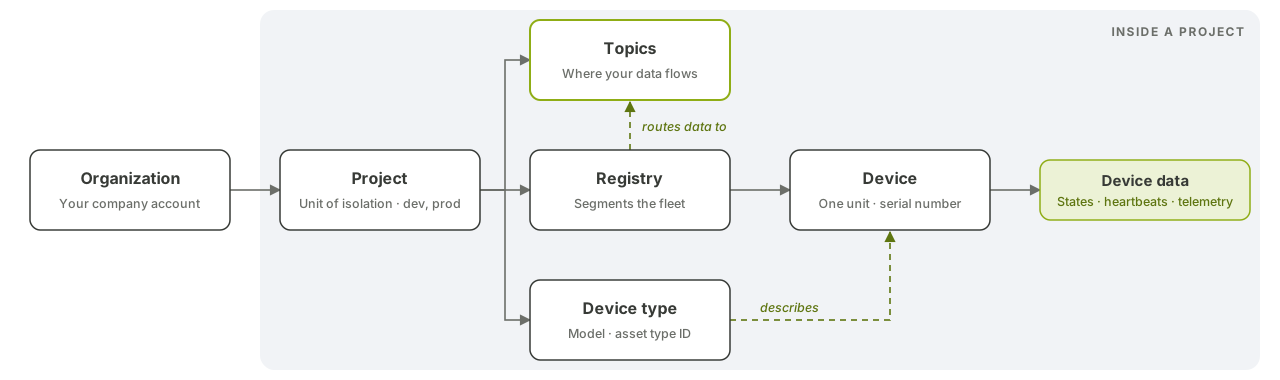
Everything you manage sits in a tree. An organization owns projects, a project holds registries and device types, and every device belongs to exactly one registry and one device type.
Organization
The organization is your company's account in Fundamentum. It owns your projects.
Project
The project is the unit of isolation. Almost every resource (registries, device types, devices, topics, action types, service accounts) belongs to one project, and most roles are granted per project. A token that has access to one project is refused on another. A common setup is one project for development and one for production.
Registry
A registry groups devices inside a project. Use registries to segment your fleet, for example by site, by customer or by kind of installation. A registry also carries the settings its devices need to come online:
- a provisioning window (start and end dates) and a quota of devices per device type;
- the provisioning secret that devices use to register, which you download from the Hub as a token file;
- MQTT connection settings and heartbeat configuration;
- the topics that receive the registry's telemetry, states and custom action results.
Device type
A device type is the model, or template, shared by similar devices. It defines the device's name and icon, whether it is a gateway, whether it is directly accessible, a default configuration and metadata, its heartbeat policy, its firmware versions, its capabilities and an optional action limit. A device type can belong to your project, or be a generic type that Fundamentum provides to all projects.
Asset type
The asset type ID is the external identifier of a device type: the number a device supplies when it provisions itself, so Fundamentum knows which device type to use. Your asset type IDs are positive integers; negative values are reserved by Fundamentum. Don't confuse the asset type ID with the device type's own id in the Public API.
Device
A device is one physical (or virtual) unit. It belongs to one registry and one device type and has its own configuration and metadata. Devices are identified by a serial number that is unique within its registry. Serial numbers use lowercase letters, digits, - and _.
Region
In the Devices API, a device is addressed by four values: project ID, region ID, registry ID and serial number. You don't choose the region ID: it's included in the registry's token file, along with the project and registry IDs.
Gateways and sub-devices
A gateway is a device whose device type is flagged as a gateway. Some devices can't reach Fundamentum on their own, for example Bluetooth beacons or LoRaWAN sensors. These sub-devices are marked as not directly accessible and communicate through a gateway. The gateway reports heartbeats, states and action results on their behalf. See Gateways and sub-devices.
What devices send
Devices send three kinds of data:
| Data | What it is | Where it goes |
|---|---|---|
| State | A key/value pair reported at a point in time, such as firmware_version or wifi_rssi. The value is any JSON value; there is no schema. |
Fundamentum keeps the full history and the last value of each key. You can read both in the Hub and through the Public API. |
| Heartbeat | A periodic liveness signal that includes the device's uptime. A drop in uptime means the device rebooted. | Drives the device's connectivity status in the Hub. |
| Telemetry | Free-form readings and events. | Routed to the project's telemetry topic. |
States are what the device reports. Fundamentum has no "desired state": to change something on a device, you send it an action.
Topics
A topic is a publish/subscribe channel owned by a project. Each project has default topics of type telemetry, states and custom_actions. Registries are bound to topics, so device data flows into them. Connectors deliver topics to your own systems, and cloud functions can transform the data on the way. Topic names are 3 to 256 characters long, using letters, digits and underscores. See Topics and Connectors.
Actions, commands and capabilities
These three concepts all send work to devices, at different levels of abstraction.
Action type and action. An action type is a template: a type number that the firmware recognizes, timeouts, retries and a priority (a lower value means a higher priority). An action is one use of that template: a payload sent to one or more devices. Each device's copy of the action goes through statuses such as pending, queued, sent and ongoing, and ends in success, failure, timeout or cancel. Failed actions can be retried. In the quickstart, the LED colour is an action type with type 1000.
Command. A command is a predefined platform instruction, such as reboot, firmware update or configuration update. You can send it to many devices in one batch.
Capability. A capability is a named operation a device can perform, such as reboot. For each device type, and optionally for each firmware version, a capability is linked to an encoder (a cloud function) and a protocol. The encoder translates the generic request into what that hardware and firmware expect. This way, the same operation works across a mixed fleet. If both a version-specific link and an all-versions link exist, the version-specific link applies.
See Actions and custom encoders and Firmware updates (OTA).
Roles
Access is controlled by roles. A role is a set of permissions, each allowing an action (such as list, show, store, update or delete) on a kind of resource. You grant a role to a user or a service account on a project, or on a license when you serve your own customers. See Roles and permissions and Authentication.
What's next
- Quickstart: AtomS3 Lite: see these concepts on a real device.
- Provisioning: register your devices in a registry.
- Glossary: short definitions of every term.