Security and trust
This page explains how Fundamentum protects your devices, your users and applications, and the platform itself. It is written for your IT and security teams.
Devices
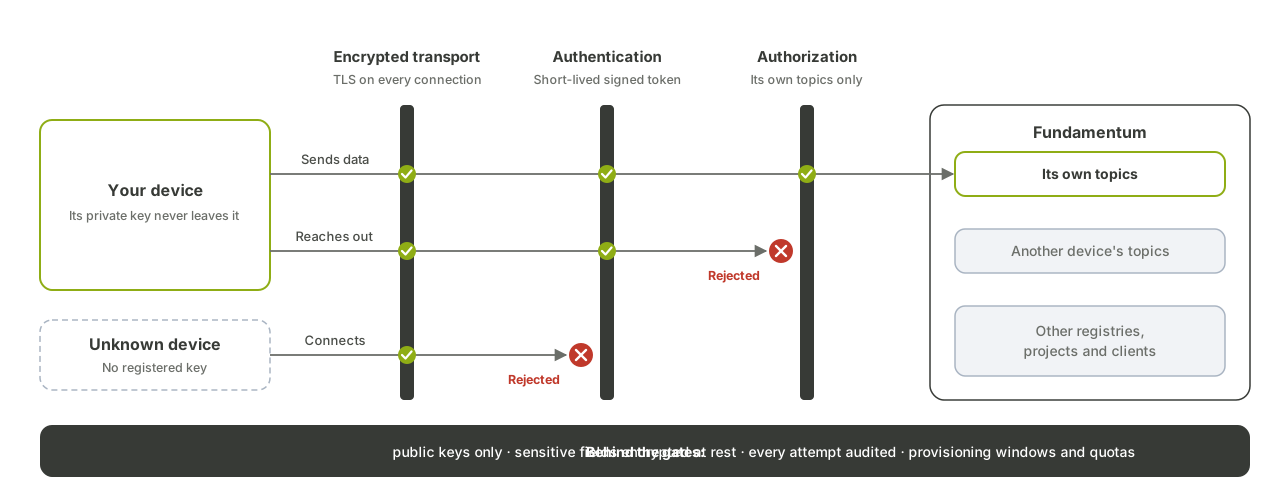
Every device crosses three barriers before it reaches its data.
| Barrier | What it means for you |
|---|---|
| Encrypted transport | Devices connect over TLS only: MQTT 5 over TLS to the broker, HTTPS to the Devices API. |
| Authentication | Each device has its own identity, based on an RSA key pair. The device keeps its private key and signs a short-lived token (an RS256 JWT) with it to connect. Fundamentum stores only the public key, so no shared secret ever travels on the wire, and a device without a registered key is rejected. |
| Authorization | A connected device reaches only its own topics. It cannot read or write another device's topics, nor anything in another registry, project or client. This isolation is also what separates one client from another. |
Behind those barriers:
- Public keys only. The private key is generated on the device or by whoever prepares it, and never reaches Fundamentum.
- Sensitive device fields are encrypted at rest.
- Every authentication attempt is audited, successful or not.
- Provisioning windows and quotas. A registry accepts new devices only during its provisioning window, and only up to a quota per device type.
- Safe by default. A device is never re-provisioned by accident: replacing the credentials of an already provisioned device is always an explicit step.
See Onboard and secure devices and Authentication.
Users and applications
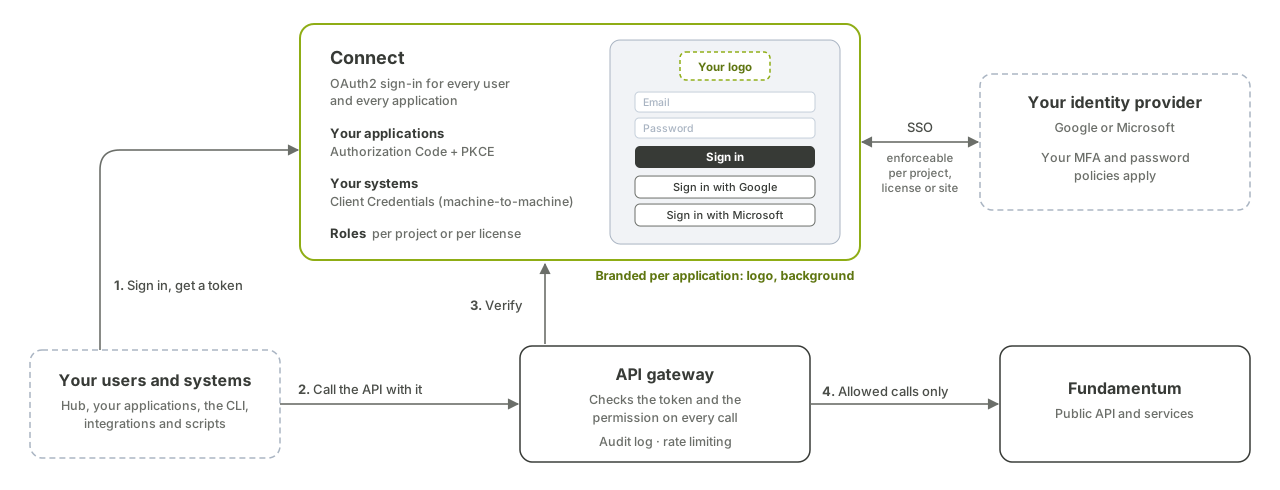
Every person and every application signs in through Connect, Fundamentum's OAuth2 server, then calls the Public API with the token it receives.
| Who | How they sign in |
|---|---|
| People, in the Hub or your own web and mobile applications | OAuth2 Authorization Code with PKCE |
| Your back-end systems, scripts and integrations | OAuth2 Client Credentials (machine to machine), or a service account token |
The fun CLI |
Browser sign-in, then the same tokens |
- Single sign-on. Users can sign in with Google or Microsoft, so your own identity provider's MFA and password policies apply. SSO can be enforced per project, per license or per site.
- Branded sign-in. Each application's sign-in page can carry its own logo and background.
- Fine-grained RBAC. A role is a named set of permissions, granted on an organization, a project or a license. Licenses let you serve your own customers, each with its own users and sites, without giving them access to the rest of your project.
- Every call is checked. The API gateway verifies the token and the caller's permission on every request, and only allowed calls reach the platform.
- Audit log and rate limiting. Every Public API call is recorded in an audit log, and request rates are limited per user.
See Govern access and Roles and permissions.
Platform
- Secrets are kept in a dedicated secret store, sealed by a key management service. Secrets that are versioned with the platform's configuration are stored encrypted.
- Just-in-time operator access. Dimonoff operators get ephemeral, read-only credentials to production systems and databases, issued through SSO and valid for a few hours.
- TLS on every external entry point.
- Encrypted database backups.
- Continuous scanning. The security posture of the infrastructure is scanned continuously, and every change to the platform goes through a vulnerability scan before it ships.
- Everything as code. Infrastructure and deployments are defined in git and reviewed, with no manual change to production. See Architecture overview.
Status page
Fundamentum publishes a public status page showing the health of the platform's components. You can subscribe to it to be notified of incidents by email, Slack or Microsoft Teams.
What's next
- Architecture overview
- Govern access
- Authentication: get a token and call the API.