Authentication
This page explains the three kinds of credentials Fundamentum uses and when to use each one. It also shows how to get a token and call the Public API with it.
| Who | Credential | Used with |
|---|---|---|
| People | A Connect account, signed in through the browser | Hub, fun CLI, Public API |
| Integrations, scripts and CI | A service-account token or a personal API key | Public API, fun CLI |
| Devices | A registry token file, a device key pair, or a provisioning key | Devices API and MQTT broker only |
User and integration tokens never work on the Devices API. Device credentials never work on the Public API.
Before you begin
- You have a Connect account. Accounts are created by invitation: a project manager invites you, or you join a starter-kit project as in the quickstart.
- To create service accounts, your role on the project must allow it. See Roles and permissions.
Users: sign in with Connect
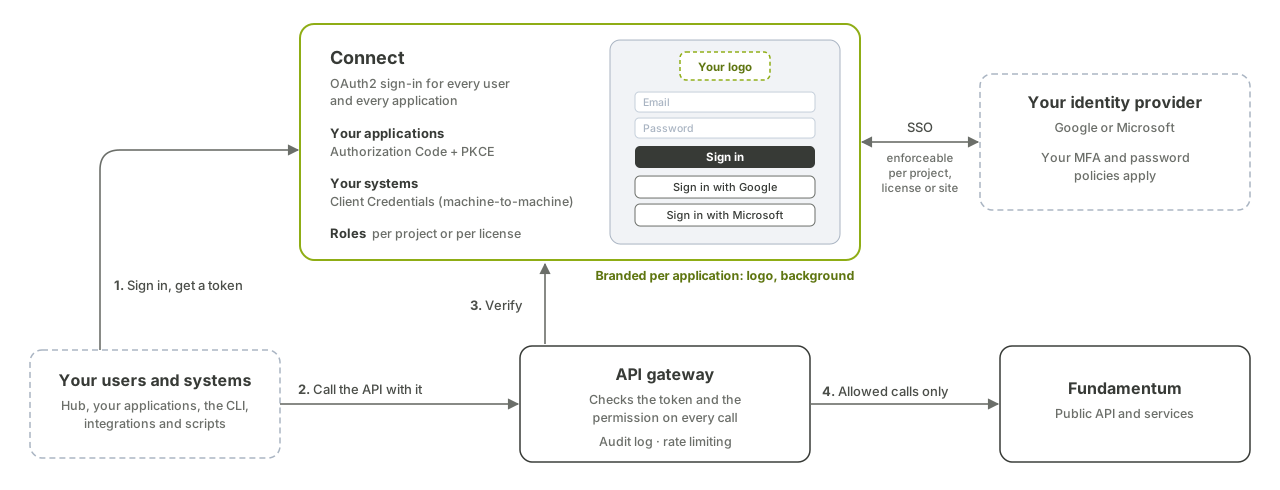
Connect is the Fundamentum identity service. You sign in at https://oauth.fundamentum-iot.com/authx/login with your password, or with Google or Microsoft. The Hub and the other Fundamentum applications send you there and receive a token through the OAuth 2.0 authorization code flow.
Sign in from the command line
fun login signs you in through the browser and stores the token for later fun commands:
fun login
The CLI asks for a context name and the endpoints. The defaults, https://api.fundamentum-iot.com and https://oauth.fundamentum-iot.com, are right for Fundamentum Cloud. The CLI then opens your browser and saves the token in contexts.json in its configuration directory (fun config dir prints the path).
- Run
fun loginagain when your token expires. Add--overrideto change the endpoints of an existing context. - If you work with several environments, create one context per environment. List them with
fun config contexts listand select one with--context <name>on any command.
Check who you are signed in as, and which roles you have:
fun api v2 users introspect-user
Sign in from your own application
If you build an application that signs users in, register it as an OAuth client in Connect. Your organization can register two kinds of clients:
- A confidential client has a client secret. Use it for server-side applications that can keep the secret.
- A public client has no secret and must use PKCE (
code_challenge_method=S256) on/oauth/authorizeand/oauth/token. Use it for single-page and mobile applications.
Use the authorization code flow. Don't use the implicit flow in new applications.
Integrations: service accounts and API keys
For anything that runs without a person in front of it, such as a backend, a script or a CI job, use a token that doesn't need a browser.
- A service account is a non-human identity that belongs to one project. You grant it a role, like a user, and create one or more tokens for it. Prefer service accounts for integrations: access stays the same when people join or leave your team.
- A personal API key acts as you, with your roles. It suits quick personal scripts. In Connect, open My account → API keys → Create new token, give it a name, and select Save. Copy the key right away: it is shown only once.
Create a service account
In Connect, open Service Accounts → Create Service Account, enter an identifier of at least 3 characters, assign a role, then create a token under API Keys.
You can do the same with the fun CLI:
-
Create the service account:
fun api v2 service-accounts create-service-account --project-id <project-id> --body '{"name": "my-integration"}' -
Grant it a role. The role must be assignable on the service account's project:
fun api v2 service-accounts create-service-account-role --project-id <project-id> \ --service-account-id <service-account-id> --body '{"role_id": <role-id>}' -
Create a token:
fun api v2 service-accounts create-service-account-token --project-id <project-id> \
  --service-account-id <service-account-id> --body '{"name": "ci"}'
The response contains the token in
data.accessToken. Store it in your secret manager right away: it is shown only once. Ifdata.token.expires_atisnull, the token doesn't expire.
To revoke a token, list the tokens with list-service-account-tokens, then delete one with delete-service-account-token --token-id <token-id>.
Use a token with the fun CLI
To run fun api commands with a service-account token, for example in CI, set two environment variables instead of running fun login:
export FUN_CONTEXT_FUNDAMENTUM_IOT_ENDPOINT=https://api.fundamentum-iot.com
export FUN_CONTEXT_API_KEY=$TOKEN
fun api v1 registry list-registries --project-id <project-id>
The CLI prints Using anonymous context from environment when it picks up these variables.
Call the Public API
Every Public API request, in v1 and v2 alike, takes the token in the Authorization header. The same token works for both versions.
curl -H "Authorization: Bearer $TOKEN" \
  https://api.fundamentum-iot.com/v2/users/introspect
Successful responses are wrapped as {"status": "success", "data": ...}, and errors as {"status": "error", "message": ...}.
| Status | Meaning | What to do |
|---|---|---|
401 |
The token is missing, expired, or belongs to another environment. | Sign in again, or check the token and the endpoint. |
403 |
The token is valid, but its roles don't allow this operation on this project. The message names the missing permission, for example User <name> is not authorized to perform <container>:<action> in project <project-id>. |
Ask a project manager to grant a role with that permission. |
Permissions are scoped: a token with a role on one project is refused on another project.
You can browse the API and try requests in Swagger UI at /v1/docs and /v2/docs. The machine-readable specifications are at /v1/api/swagger.json and /v2/api/openapi.json on the same host. See the Public API reference.
Devices: device credentials
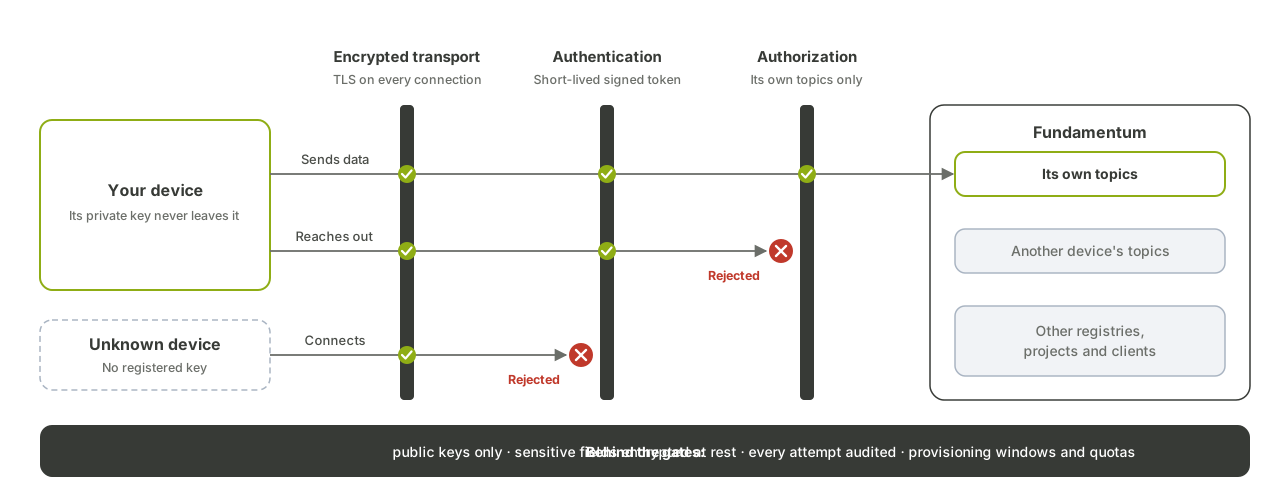
Devices authenticate with the Devices API (https://devices.fundamentum-iot.com) and the MQTT broker, never with user or service-account tokens.
- Registry token file. You download it from the registry in the Hub (Download Token file). It contains
project_id,region_id,registry_idandtoken. A device sendstokento register itself with the registry. See Self-provisioning. - Device key pair. Each device has its own private key, and only the public key is registered with Fundamentum. The device signs JWTs (RS256) with its private key to connect. See Connect over MQTTS.
- Provisioning key. For devices registered at the factory, a provisioning key is valid between a start date and an end date, and is sent as a Bearer token to the Devices API. You create provisioning keys with a user or service-account token. See Shelf devices and provisioning keys.
The Devices API specification is at https://devices.fundamentum-iot.com/api/v3/swagger.json, browsable in Swagger UI. See the Devices API v3 reference.
What's next
- Roles and permissions: choose the right role for a user or service account.
- The fun CLI: script your fleet from the command line.
- Provisioning: give your devices their credentials.