Devices API v3
This page lists every endpoint of the Devices API v3, the credential each one expects, and the request and response conventions. Use it with the live OpenAPI spec when you build device firmware, factory tooling or provisioning scripts.
Base URL and specification
| Item | Value |
|---|---|
| Base URL | https://devices.fundamentum-iot.com |
| OpenAPI spec (v3) | https://devices.fundamentum-iot.com/api/v3/swagger.json |
| Swagger UI | https://devices.fundamentum-iot.com/api/v3/docs/ |
| Health check | GET /status (no credential) |
The spec is OpenAPI 3.0.1. Generate a client from it with any OpenAPI generator, as described in Public API.
The Devices API is for devices and the tools that onboard them. To manage your fleet, users and data, use the Public API.
Credentials
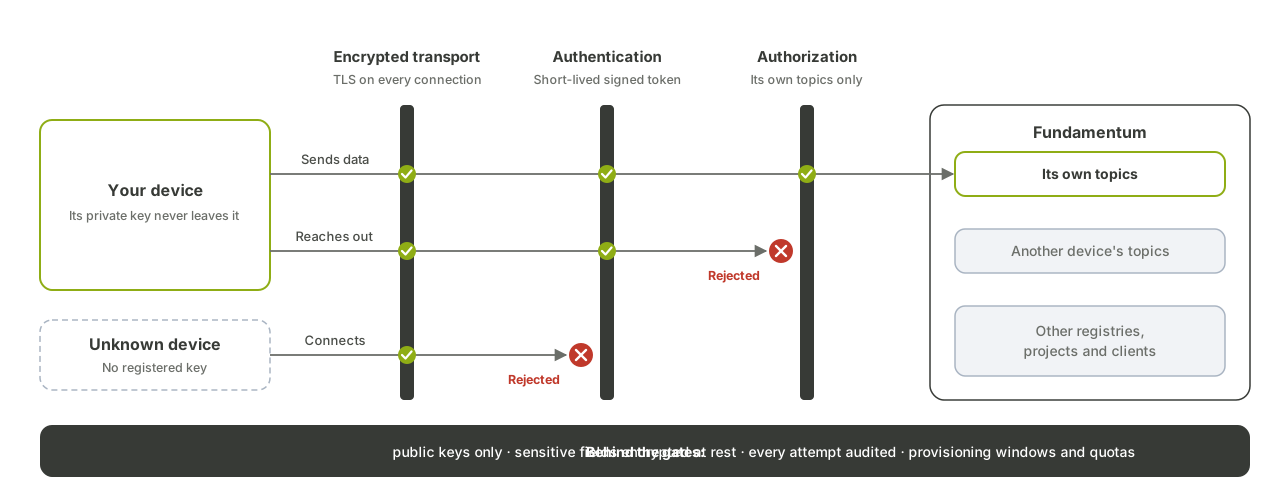
Every credential travels in the request, never in the URL. Bearer credentials use the Authorization: Bearer <value> header.
| Credential | Spec scheme | What it is | Where you get it |
|---|---|---|---|
| Registry token | none (body field access_token) |
A token scoped to one registry, sent in the body of provisioning requests | The token file generated in the Hub, or GET /api/v3/registries/{registry_id}/token |
| Device JWT | deviceJwtKey |
A JWT the device signs with its own private key. It is the same kind of token the device uses as its MQTT password | Generated on the device, see MQTT topics and message formats |
| Provisioning key | provisioningKey |
A UUID valid between a start and an end date, for factory pre-registration | POST .../provisioning-keys |
| User or service-account token | oAuthFundamentum |
The same OAuth2 token you use on the Public API | fun login, or a service-account token, see Authentication |
A device JWT or a provisioning key is never accepted by the Public API.
Endpoints
In the table, {P} stands for /api/v3/projects/{project_id}/regions/{region_id}. The region ID is 1 unless you were told otherwise.
Provisioning
| Method | Path | Credential | Purpose |
|---|---|---|---|
POST |
/api/v3/provision |
Registry token in body | Safe provisioning. Returns 409 if the device is already provisioned |
PUT |
/api/v3/provision |
Registry token in body | Forceful provisioning: replaces the device's key on purpose |
GET |
/api/v3/registries/{registry_id}/token |
User token | Get the registry token file |
Request body for both provisioning methods:
| Field | Type | Description |
|---|---|---|
project_id |
integer | Your project |
region_id |
integer | The region |
registry_id |
integer | The registry the device joins |
serial_number |
string | Device serial number (see identifiers) |
asset_type_id |
integer | Asset type. Defaults to 2 (IoT device). This is not the device type ID |
access_token |
string | The registry token |
algorithm |
string | RS256 or Password |
secret |
string | The device's public key in PEM format (for RS256) |
POST /api/v3/provision HTTP/1.1
Host: devices.fundamentum-iot.com
Content-Type: application/json

{
  "project_id": <project-id>,
  "region_id": 1,
  "registry_id": <registry-id>,
  "serial_number": "<serial-number>",
  "asset_type_id": 2,
  "access_token": "<registry-token>",
  "algorithm": "RS256",
  "secret": "-----BEGIN PUBLIC KEY-----\n...\n-----END PUBLIC KEY-----"
}
A successful response returns the device configuration and where to connect:
{
  "status": "success",
  "data": {
    "configuration": {},
    "mqtt": { "host": "mqtts.fundamentum-iot.com", "port": 8883 }
  }
}
If the device already exists, POST answers:
{
  "status": "error",
  "message": "Authorization conflict",
  "data": { "error": "device already provisioned" }
}
Re-provisioning is always an explicit step: use PUT only when you mean to replace the key. See Self-provisioning.
The registry token file contains server_url, mqtt_host, mqtt_port, token, project_id, region_id and registry_id.
Devices
| Method | Path | Credential | Purpose |
|---|---|---|---|
POST |
{P}/registries/{registry_id}/devices |
User token | Register a device: serial_number, name, asset_type_id |
GET |
{P}/registries/{registry_id}/devices/{serial_number} |
User token | Get the device configuration |
DELETE |
{P}/registries/{registry_id}/devices/{serial_number} |
User token | Delete the device |
POST |
{P}/registries/{registry_id}/devices/{serial_number}/set-authorization |
User token | Set the device credential: algorithm and secret |
POST |
{P}/registries/{registry_id}/devices/{serial_number}/configuration |
User token | Update configuration and/or meta_data. At least one is required, otherwise 422 |
POST |
{P}/registries/{registry_id}/devices/{serial_number}/heartbeat |
User token | Send a heartbeat: {"uptime": <seconds>}. A lower uptime than the previous one records a reboot |
GET |
{P}/registries/{registry_id}/devices/{serial_number}/states |
User token | Get the latest states |
POST |
{P}/registries/{registry_id}/devices/{serial_number}/telemetry |
Device JWT | Publish telemetry. The body is free-form JSON. Returns {"status":"success"} |
Telemetry over HTTPS is the alternative to MQTT for devices that cannot keep a connection open. See HTTPS alternative.
curl -X POST "https://devices.fundamentum-iot.com/api/v3/projects/<project-id>/regions/1/registries/<registry-id>/devices/<serial-number>/telemetry" \
  -H "Authorization: Bearer $DEVICE_JWT" \
  -H "Content-Type: application/json" \
  -d '{"temperature": 21.4}'
Shelf devices
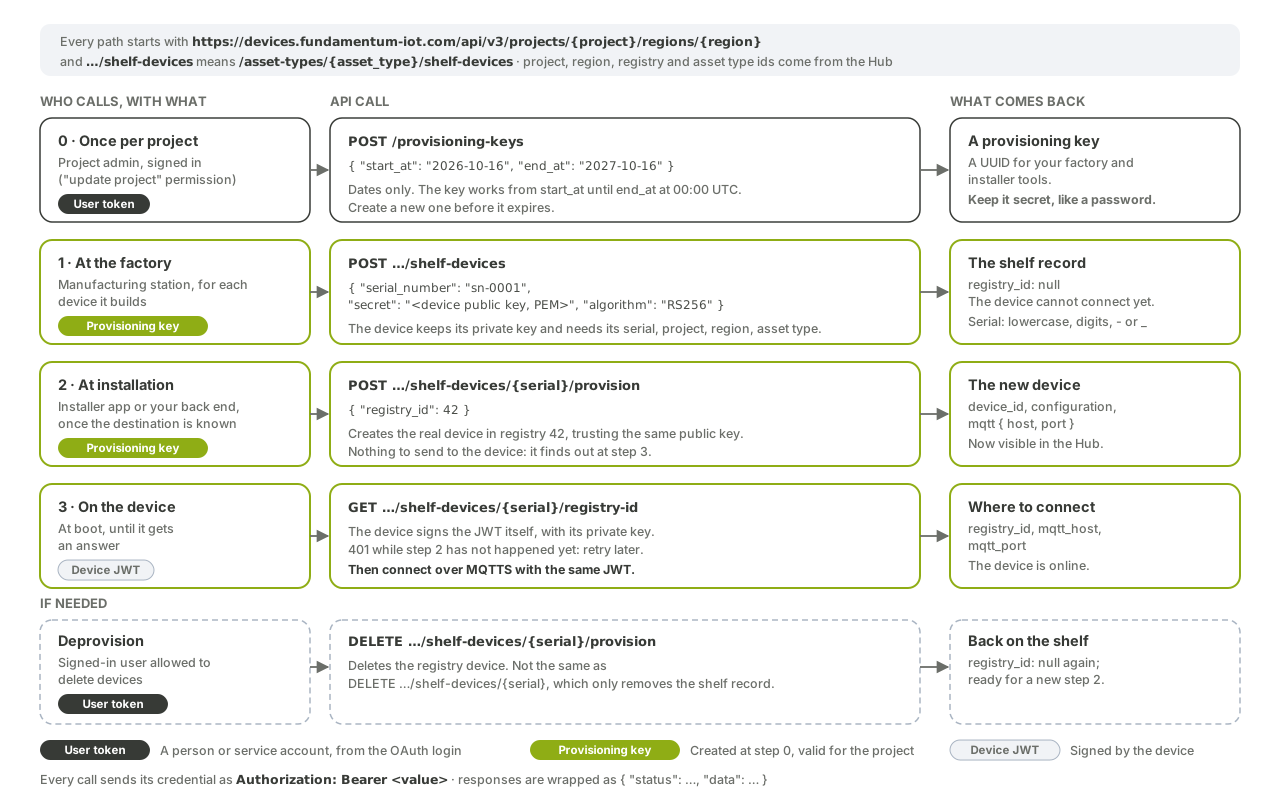
Shelf devices are pre-registered at the factory with a provisioning key, then assigned to a registry later. See Shelf devices and provisioning keys.
| Method | Path | Credential | Purpose |
|---|---|---|---|
POST |
{P}/asset-types/{asset_type_id}/shelf-devices |
Provisioning key | Register a shelf device: serial_number, secret, algorithm |
GET |
{P}/asset-types/{asset_type_id}/shelf-devices/{serial_number} |
Provisioning key | Get a shelf device |
DELETE |
{P}/asset-types/{asset_type_id}/shelf-devices/{serial_number} |
Provisioning key | Delete a shelf device |
POST |
{P}/asset-types/{asset_type_id}/shelf-devices/{serial_number}/provision |
Provisioning key | Assign to a registry: {"registry_id": <registry-id>}. Returns device_id, configuration and mqtt (host, port, client_id). 422 if already provisioned |
DELETE |
{P}/asset-types/{asset_type_id}/shelf-devices/{serial_number}/provision |
User token | Deprovision |
GET |
{P}/asset-types/{asset_type_id}/shelf-devices/{serial_number}/registry-id |
Device JWT | The device asks where it belongs. Returns registry_id, mqtt_host, mqtt_port. Returns 401 until the device is assigned |
Provisioning keys
| Method | Path | Credential | Purpose |
|---|---|---|---|
GET |
{P}/provisioning-keys |
User token | List active keys |
POST |
{P}/provisioning-keys |
User token | Create a key: start_at, end_at |
GET |
{P}/provisioning-keys/{key} |
User token | Get a key |
DELETE |
{P}/provisioning-keys/{key} |
User token | Delete a key |
start_at and end_at are dates in YYYY-MM-DD format, read as midnight UTC. A key is active when start_at ≤ now < end_at. The key itself is a UUID.
Serial numbers
- Lowercase letters, digits,
-and_. - Unique within a registry, and compared without regard to case.
- Asset type IDs are positive integers. Negative values are reserved.
Responses and errors
Responses use the status/data envelope described in Conventions.
| Status | Meaning |
|---|---|
200 |
Success |
400 |
Invalid request. data.errors lists each problem with type, msg, path and location |
401 |
Missing or invalid credential |
403 |
Authenticated, but not allowed: "No permission to do this action" |
404 |
"Resource not found" |
409 |
Conflict, for example a device that is already provisioned |
422 |
Validation failed, for example {"data": {"serial_number": "The serial number has already been taken"}} |
Other versions
| Version | Status |
|---|---|
| v3 | Current. Use it for all new work |
| v2 | Still served at /api/v2/... and not marked deprecated. It has no shelf devices, provisioning keys, telemetry or registry token endpoints |
| v1 | Deprecated. Every v1 device route is marked deprecated in its spec |
Each version publishes its spec at /api/{version}/swagger.json. See Changelog and deprecations.