Connect over MQTTS
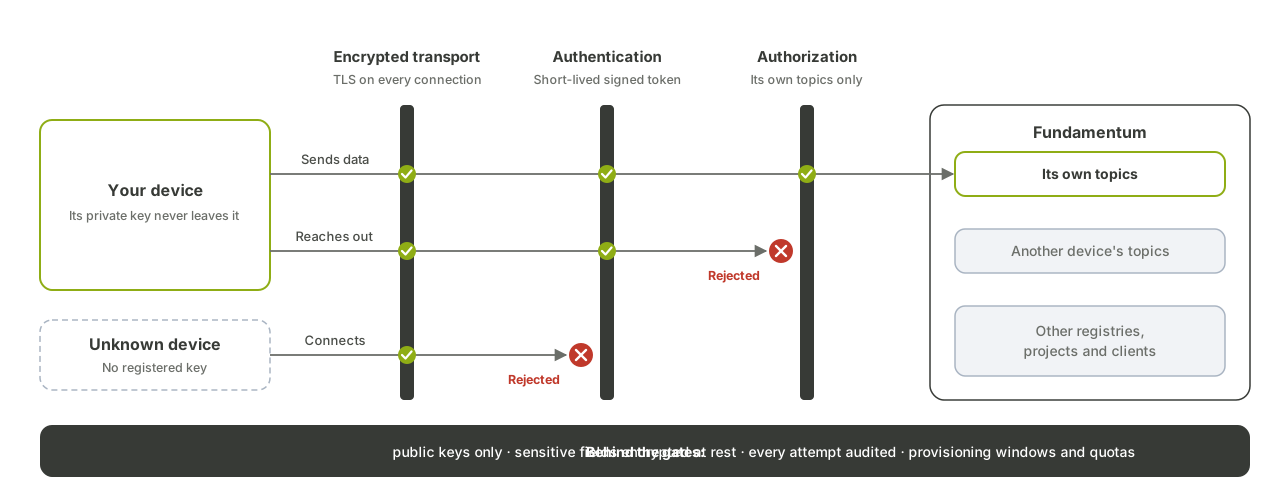
This page shows you how to open an MQTT 5 connection from a provisioned device to Fundamentum: TLS settings, the client ID, and the JWT the device signs with its own key. It also explains which topics the device can reach.
Before you begin
- The device is provisioned, and you know its project ID, registry ID and serial number. See Provisioning.
- The device holds the private key that matches the public key registered at provisioning (
rsa_private.pem). - You have an MQTT 5 client library with TLS support.
If you'd rather not implement this yourself, the Linux daemon and the MCU library handle the connection for you.
Connection settings
| Setting | Value |
|---|---|
| Host | mqtts.fundamentum-iot.com |
| Port | 8883 (TLS) |
| Protocol | MQTT 5 |
| TLS | Server certificate only; no client certificate |
| Server Name Indication (SNI) | Required: send mqtts.fundamentum-iot.com |
| CA to trust | ISRG Root X1 (isrgrootx1.pem from Let's Encrypt) |
| Client ID | projects/<project-id>/regions/1/registries/<registry-id>/devices/<serial-number> |
| Username | unused |
| Password | A JWT signed with the device private key |
1. Embed the CA
Download isrgrootx1.pem from Let's Encrypt and embed it in your firmware. To inspect the certificate chain the broker presents:
openssl s_client -showcerts -verify 5 -connect mqtts.fundamentum-iot.com:8883
Most libraries send SNI automatically. On bare-metal modems, set the SNI name explicitly in the TLS configuration; without it, the handshake fails.
If the device also downloads firmware files, embed DigiCert Global Root G2 as well: firmware files are served under that root. See Firmware updates (OTA).
2. Sign the device JWT
The password is a JWT signed with RS256 using the device private key. It carries three required claims:
| Claim | Value |
|---|---|
aud |
The project ID, as a string (for example, "123") |
iat |
Issue time, in Unix seconds |
exp |
Expiry time, in Unix seconds |
For example, in Python with PyJWT:
import time
import jwt

now = int(time.time())
claims = {"aud": "<project-id>", "iat": now, "exp": now + 3600}
with open("rsa_private.pem") as f:
    token = jwt.encode(claims, f.read(), algorithm="RS256")
print(token)
The same JWT authenticates the device on the HTTPS alternative and on the shelf-device registry lookup.
3. Connect
Use the client ID that identifies your device. The short form <project-id>.1.<registry-id>.<serial-number> is also accepted when the client ID length is limited.
For example, with the Mosquitto client, subscribe to the device configuration:
mosquitto_sub -V mqttv5 \
  -h mqtts.fundamentum-iot.com -p 8883 --cafile isrgrootx1.pem \
  -i "projects/<project-id>/regions/1/registries/<registry-id>/devices/<serial-number>" \
  -u unused -P "$JWT" \
  -t "registries/<registry-id>/devices/<serial-number>/config"
The broker refuses the connection when the JWT signature doesn't match the device's registered key, or when aud doesn't match the project in the client ID. Sign a fresh JWT before each reconnection.
4. Stay within the device's topics
A device can only publish and subscribe under its own prefix:
registries/<registry-id>/devices/<serial-number>/
| Direction | Topic suffix | Purpose |
|---|---|---|
| Publish | events, events/<name> |
Telemetry |
| Publish | states |
States |
| Publish | heartbeat |
Heartbeat |
| Publish | subdevices/<sub-serial-number>/events |
Telemetry for a sub-device |
| Publish | commands/<id> |
Command outcome |
| Subscribe | config |
Device configuration, sent when you subscribe |
| Subscribe | commands |
Commands |
| Subscribe | actions, custom_actions, custom_actions/<name> |
Actions |
Port forwarding, action responses and the message formats are covered in MQTT topics and message formats.
What's next
- Send telemetry, states and heartbeats.
- Gateways and sub-devices if the device reports for others.
- MQTT topics and message formats for every topic and payload.