Alerts
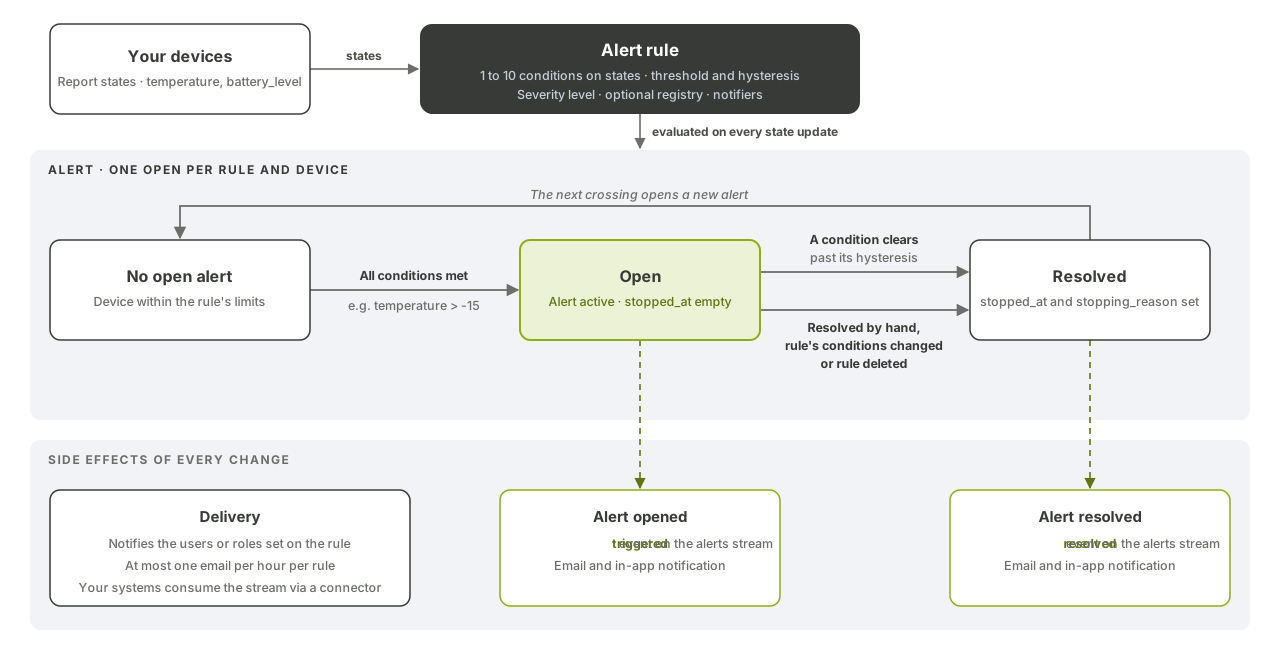
Alert rules watch the states your devices report and open an alert when a device crosses a threshold. Fundamentum then notifies the right people by email and in-app, closes the alert when the device recovers, and publishes every change on an event stream your systems can consume.
Before you begin
- Your devices send states, for example
temperatureorbattery_level. See Send telemetry, states and heartbeats. - You have the
funCLI logged in, or a token for the Public API. - You hold
project_managerordevices_manageron the project to manage rules and notifiers. See Roles and permissions. - You know your
<project-id>, and optionally the<registry-id>to limit the rule to.
How it works
An alert rule has a name, a severity level, one to ten conditions, optional messages and optional notifiers. An alert opens for a device when all conditions of the rule are met, and closes as soon as one of them no longer is. Only one alert per rule and device is open at a time.
There are six severity levels, from lowest to highest: info, advisory, warning, minor, major and critical. A rule created without a level is critical.
A condition compares one state with a threshold:
| Operator | Numbers | Text |
|---|---|---|
=, != |
Yes | Yes |
>, < |
Yes | No |
Hysteresis
Hysteresis prevents an alert from flapping when a value hovers around the threshold. It's a release threshold, not a margin: once the condition is triggering, it stays triggering until the value crosses the hysteresis value.
For temperature > 75 with hysteresis 70, the alert opens above 75 and closes only below 70. For >, hysteresis must be lower than the threshold; for <, higher. It doesn't apply to = and !=.
1. Find who to notify
fun api v1 alert get-alert-rule-notifiable --project-id <project-id>
The response lists the project's users (with id, name and email) and the roles you can notify, as role name and label pairs such as {"devices_manager": "Devices Manager"}. Notifiers use the user id or the role name.
2. Create a rule
fun api v1 alert store-alert-rule --project-id <project-id> --body '{
  "name": "Freezer too warm",
  "description": "Freezer temperature above safe limit",
  "is_active": true,
  "level": "major",
  "registry_id": <registry-id>,
  "conditions": [
    {"name": "Temperature", "state": "temperature", "operator": ">", "value": "-15", "hysteresis": -17}
  ],
  "alert_messages": [
    {"language": "en", "message": "Freezer temperature is above -15 °C."},
    {"language": "fr", "message": "La température du congélateur dépasse -15 °C."}
  ],
  "notifiers": [
    {"notifiable_type": "roles", "notifiable": ["devices_manager"], "action_url": "https://app.example.com/alert-rules/{alert_rule_id}"}
  ]
}'
- Without
registry_id, the rule applies to every device of the project. - Messages support
enandfr. - A notifier targets
users(a list of user IDs) orroles(every user holding that role on the project).{alert_rule_id}inaction_urlis replaced in the notification link.
The response doesn't include the notifiers. Check them with fun api v1 alert get-alert-rule-notifiers --project-id <project-id> --alert-rule-id <alert-rule-id>, and manage them with the projects-alert-notifier commands of fun api v2.
3. Receive notifications
Each notified user gets an email, sent from your project's sender address, and an in-app notification under the bell icon. Both are sent when the alert opens and when it's resolved.
To avoid floods, a user gets at most one email per hour per rule, counted separately for opened and resolved alerts. Within that hour, further occurrences raise a counter on the in-app notification instead.
4. Follow and resolve alerts
# Open alerts of a rule
fun api v1 alert get-alerts-by-rule --project-id <project-id> --alert-rule-id <alert-rule-id>

# All alerts of a device, open and closed (stopped_at)
fun api v1 alert get-alerts-by-device --project-id <project-id> --device-id <device-id>

# Close an alert by hand
fun api v1 alert resolve-alert-by-alert-id --project-id <project-id> --alert-id <alert-id>
An alert also closes when you change or remove a rule's conditions, or delete the rule. Setting is_active to false stops evaluating the rule but leaves its open alerts open.
5. Stream alert events to your systems
Activate the alerts platform stream for your project, then consume it with a connector. See Topics.
fun api v1 pub-sub scope-pub-sub-topic --project-id <project-id> --scopeable-topic alerts
Each event has event_type triggered or resolved:
{
  "event_type": "triggered",
  "data": {
    "name": "Freezer too warm",
    "project_id": 1,
    "alert_id": 79,
    "alert_rule_id": 12,
    "device_id": 101,
    "device": {"id": 101, "name": "Freezer 3", "serial_number": "sn-0001"},
    "level": "major",
    "messages": [{"language": "en", "message": "Freezer temperature is above -15 °C."}],
    "conditions": [
      {"state_key": "temperature", "state_value": "-12", "operator": ">", "is_triggering": true,
       "threshold_value": "-15", "threshold_hysteresis": "-17"}
    ],
    "created_at": "2026-10-22T14:03:11Z",
    "stopped_at": null,
    "stopping_reason": null,
    "resolved_by": null
  }
}
On resolved, stopped_at is set and stopping_reason is state_changed, manually_by_user, updated_rule or deleted_rule. When a user resolves the alert by hand, resolved_by holds that user's ID.
What's next
- API reference in Swagger UI: Alert, Projects: Alert Notifier
- Topics
- Cloud functions: react to alert events with your own code.
- Roles and permissions