Topics
Topics are the channels your project's data flows through. This page shows you which topics a project starts with, how to create your own, how to receive platform event streams such as alerts, and how device messages land on a topic.
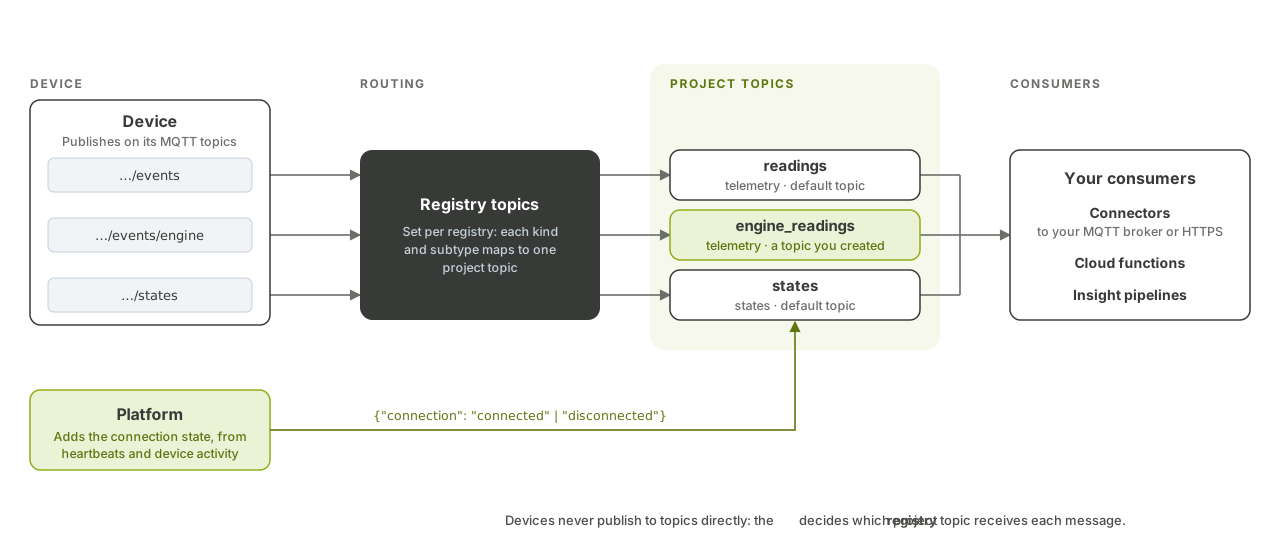
How topics work
Every topic belongs to one project and has a type that fixes the direction of its messages:
| Type | Direction | What flows on it |
|---|---|---|
telemetry |
Platform → you | Device telemetry (any format, passed through as is) |
states |
Platform → you | Device states (key/value) |
custom_actions |
You → devices | Messages forwarded to devices |
dimension, fact |
Both | Platform event streams; also used as Insight inputs |
Each project starts with three default topics, one per device-facing type: readings (telemetry), states and custom_actions. There is at most one default topic per type; marking a new topic as default unsets the previous one.
The API returns each topic's full name, built from the short name you choose: regions.<region-id>.projects.<project-id>.topics.<name>. You only ever provide the short name.
How device data reaches a topic
Devices never publish to topics directly. Each registry has registry topics that map a device MQTT topic to a project topic:
| Device publishes on | Lands on |
|---|---|
registries/<registry-id>/devices/<serial-number>/events |
The registry's default telemetry topic |
registries/<registry-id>/devices/<serial-number>/events/<subtype> |
The telemetry topic mapped to <subtype> |
registries/<registry-id>/devices/<serial-number>/states |
The registry's default states topic |
registries/<registry-id>/devices/<serial-number>/states/<subtype> |
The states topic mapped to <subtype> |
In the other direction, messages on a custom_actions topic reach devices on registries/<registry-id>/devices/<serial-number>/custom_actions[/<subtype>]. See MQTT topics and message formats for the full list.
When a registry is created, it gets one default registry topic per type, mapped to the project's default topics. Default registry topics cannot be deleted; resetting a registry's topics restores them.
A telemetry message on a project topic wraps the device payload, base64-encoded, with the device serial number:
{"deviceId": "<serial-number>", "data": "<base64-payload>"}
It also carries these headers: project_id, registry_id, serial_number, device_id, received_at (RFC 3339 with nanoseconds), and device_parent_id for sub-devices. Telemetry sent over the HTTPS alternative arrives in the same envelope.
The platform also adds a connection state to each device, connected or disconnected, based on its heartbeats and other traffic (see Monitor). It arrives on the states topic with the states the device reports itself.
Before you begin
- The
funCLI installed and signed in (see Authentication). - Your project ID and, for routing device data, a registry ID.
- Permission to manage topics in the project (see Roles and permissions).
You can also do all of this from the PubSub page of the Hub.
1. List your project's topics
fun api v1 pub-sub list-pub-sub-topics --project-id <project-id>
Each topic includes id, name, default_type, is_default, registry_topic_count and source (user for topics you created, scoping for platform event streams).
2. Create your own topic
Topic names are 3 to 256 characters: ASCII letters, digits and underscores (no dots).
fun api v1 pub-sub store-pub-sub-topic --project-id <project-id> \
  --body '{"name": "engine_readings", "default_type": "telemetry", "is_default": false}'
The raw request:
POST https://api.fundamentum-iot.com/v1/projects/<project-id>/pub-sub-topics
Authorization: Bearer $TOKEN
Content-Type: application/json

{"name": "engine_readings", "default_type": "telemetry", "is_default": false}
You can create telemetry, states and custom_actions topics. dimension and fact topics are only created by activating a platform event stream (step 4).
3. Route device messages to your topic
Map a subtype of a registry to the topic you created. Devices then publish on .../events/engine to reach engine_readings:
fun api v1 registry store-registry-topic --project-id <project-id> --registry-id <registry-id> \
  --body '{"registry_id": <registry-id>, "pub_sub_topic_id": <topic-id>, "type": "telemetry", "sub_type_name": "engine"}'
To return a registry to its default mapping:
fun api v1 registry reset-registry-topics --project-id <project-id> --registry-id <registry-id>
A topic cannot be deleted while registry topics still reference it; remove those mappings first.
4. Receive platform event streams
The platform publishes its own events (for example alerts) on platform-wide streams. Activating one for your project copies every event that concerns your project, in real time, to a dedicated topic in your project.
List the available streams:
fun api v1 pub-sub list-scopeable-topics --project-id <project-id>
Each entry has a name, a type (dimension or fact) and, once activated, the scoped_name of your project's copy.
Activate one, for example alerts:
fun api v1 pub-sub scope-pub-sub-topic --project-id <project-id> --scopeable-topic alerts
Activation is idempotent. The project topic is named regions.<region-id>.projects.<project-id>.<type>.<stream> and keeps each event's key, value and headers.
To stop receiving events:
fun api v1 pub-sub unscope-pub-sub-topic --project-id <project-id> --scopeable-topic alerts
Deactivating keeps the project topic, so you can reactivate later. Events published while the stream is inactive are not copied.
What's next
- API reference in Swagger UI: PubSub, Registry
- Connectors: deliver these topics to your broker or HTTPS endpoint.
- Cloud functions: trigger code on every message of a topic.
- Query your data with Insight: use topics as pipeline sources.
- Public API reference: full schemas for topics and registry topics.