Query your data with Insight
Insight turns your topic streams into a queryable data warehouse without writing code: you declare tables, describe how messages map to them, and query the result from any SQL client. This page walks you through creating an instance, building a pipeline and connecting with a MySQL client.
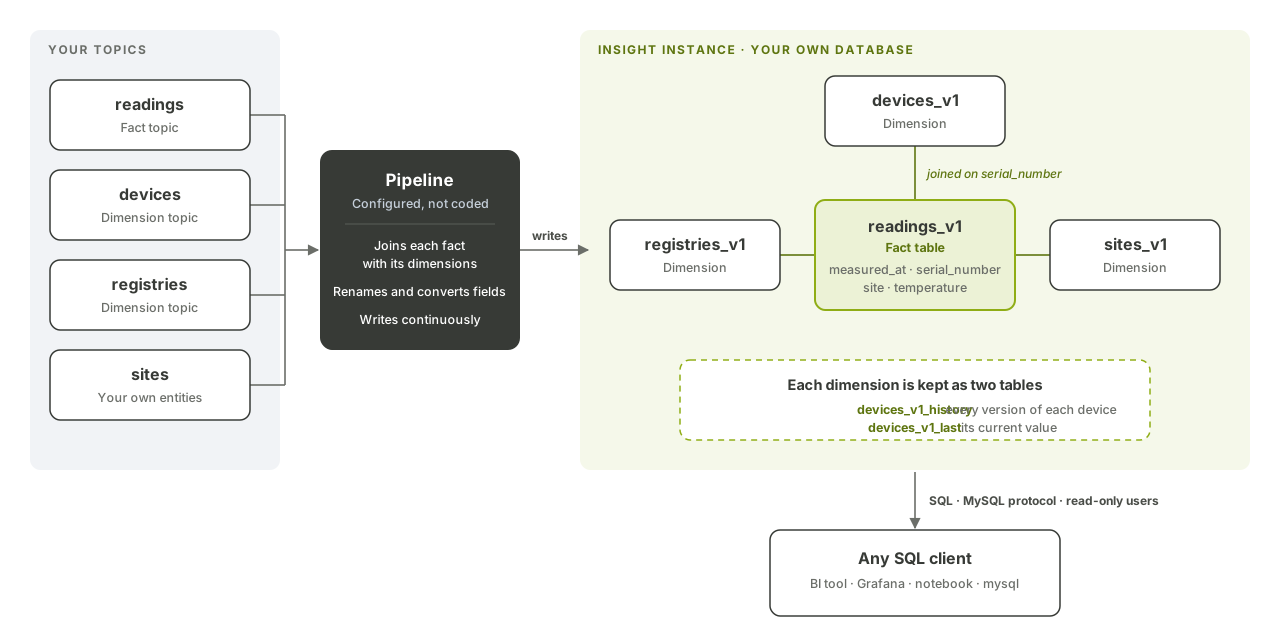
How Insight works
- An instance is your own isolated database, with dedicated resources, users and data. A project can have several instances.
- Tables follow a star schema: fact tables hold events (readings, alerts…), dimension tables describe the entities they refer to (devices, sites…).
- A pipeline reads your topics, joins each fact with its dimensions, and writes the result to your tables continuously. Pipelines run on Apache Flink and data is stored in Apache Doris.
- Dimensions are historized: Insight keeps every version of an entity and, separately, its current value.
- You query the instance over the MySQL protocol, from BI tools, Grafana, notebooks or the
mysqlcommand line.
Before you begin
- The
funCLI installed and signed in (see Authentication). - Insight enabled for your project.
- The
insightpermissionslist,show,store,updateanddeleteon the project (see Roles and permissions). - Topics carrying your data in the Insight message format (step 3).
1. Create an instance
fun api v2 insight create-insight-instance --project-id <project-id> --body '{"name": "plant-analytics"}'
The response contains the instance id. Its database is named instance_<instance-id>_database.
2. Create the tables
Each table needs at least one DATETIME key column, key columns listed before value columns, a partitioning column and at least one bucketing column. Supported column types are BOOLEAN, TINYINT, SMALLINT, INT, BIGINT, LARGEINT, FLOAT, DOUBLE, DECIMAL, DATE, TIME, DATETIME, CHAR, VARCHAR, STRING and JSON.
A dimension describing your devices:
fun api v2 insight create-insight-instance-table --project-id <project-id> --instance-id <instance-id> --body '{
  "name": "devices", "version": 1, "type": "dimension",
  "columns": [
    {"name": "collected_at", "type": "DATETIME", "is_key": true},
    {"name": "serial_number", "type": "VARCHAR(64)", "is_key": true},
    {"name": "site", "type": "STRING"}
  ],
  "partitioning": {"column": "collected_at", "unit": "month"},
  "bucketing": {"columns": ["serial_number"]},
  "indexes": []
}'
A fact table for the readings:
fun api v2 insight create-insight-instance-table --project-id <project-id> --instance-id <instance-id> --body '{
  "name": "readings", "version": 1, "type": "fact",
  "columns": [
    {"name": "measured_at", "type": "DATETIME", "is_key": true},
    {"name": "serial_number", "type": "VARCHAR(64)", "is_key": true},
    {"name": "site", "type": "STRING"},
    {"name": "temperature", "type": "DOUBLE"}
  ],
  "partitioning": {"column": "measured_at", "unit": "day"},
  "bucketing": {"columns": ["serial_number"]},
  "indexes": []
}'
In the database, a fact table is named <name>_v<version> (readings_v1). A dimension creates two tables: <name>_v<version>_history with every version of each entity, and <name>_v<version>_last with only the latest one.
Get the column IDs you need for the pipeline:
fun api v2 insight get-insight-instance-table --project-id <project-id> --instance-id <instance-id> --table-id <table-id>
3. Send data in the Insight format
Pipelines read JSON messages whose fields sit in a data object. The field names are the ones you declare on the pipeline:
{"data": {"measured_at": "2026-10-22 14:30:00", "serial_number": "A1B2C3", "temperature": "21.5"}}
Values are cast to the column type. Date-times use a space (YYYY-MM-DD HH:MM:SS); for values with a UTC offset, such as timestamps from platform event streams, apply the mv_to_utc transform to the field.
Device telemetry reaches your topics wrapped and base64-encoded, so a cloud function is the usual way to decode it and write this format to a dedicated topic.
4. Configure the pipeline
Write the pipeline to pipeline.json. Field references (source_field_ref, source_join_field_ref, dimension_join_field_ref, dimension_field_ref) are 0-based positions in the fields lists:
{
  "sources": [
    {"name": "readings", "topic_id": <readings-topic-id>, "debug": false,
     "fields": [{"name": "measured_at"}, {"name": "serial_number"}, {"name": "temperature"}]}
  ],
  "dimensions": [
    {"name": "devices", "topic_id": <devices-topic-id>, "table_id": <devices-table-id>,
     "fields": [
       {"name": "collected_at", "column_id": <collected-at-column-id>},
       {"name": "serial_number", "column_id": <serial-number-column-id>},
       {"name": "site", "column_id": <site-column-id>}
     ]}
  ],
  "sinks": [
    {"name": "readings_sink", "source_name": "readings", "table_id": <readings-table-id>, "weight": 1,
     "mappings": [
       {"column_id": <measured-at-column-id>, "source_field_ref": 0},
       {"column_id": <serial-number-column-id>, "source_field_ref": 1},
       {"column_id": <temperature-column-id>, "source_field_ref": 2},
       {"column_id": <site-column-id>, "dimension": "devices",
        "source_join_field_ref": 1, "dimension_join_field_ref": 1, "dimension_field_ref": 2}
     ]}
  ]
}
The last mapping is the join: it looks up the device whose serial_number matches the reading and writes its site into the fact. A mapping can also write a constant with source_value, and a sink can filter records with a condition. Two mappings cannot target the same column.
Save it, then submit it:
fun api v2 insight save-insight-instance-pipeline --project-id <project-id> --instance-id <instance-id> --body-file pipeline.json
fun api v2 insight submit-insight-instance-pipeline --project-id <project-id> --instance-id <instance-id>
Check its status (starting, running, stopping, stopped, failed…):
fun api v2 insight get-insight-instance-pipeline --project-id <project-id> --instance-id <instance-id>
To stop it, use cancel-insight-instance-pipeline. A table cannot be deleted while a sink uses it.
5. Create a database user
fun api v2 insight create-insight-user --project-id <project-id> --instance-id <instance-id> \
  --body '{"username": "bi-reader", "password": "<password>"}'
Usernames are 3 to 32 characters (letters, digits, ., _, - and @); passwords are 12 to 128 characters. Database users have read-only access to the instance's database. List them with list-insight-instance-users and remove one with delete-insight-user.
6. Query from any SQL client
| Parameter | Value |
|---|---|
| Host | insight.fundamentum-iot.com |
| Port | 9030 |
| Protocol | MySQL |
| Database | instance_<instance-id>_database |
| User and password | The database user from step 5 |
mysql -h insight.fundamentum-iot.com -P 9030 -u bi-reader -p instance_<instance-id>_database
-- Average temperature per site and day
SELECT site, DATE(measured_at) AS day, AVG(temperature) AS avg_temp
FROM readings_v1
GROUP BY site, DATE(measured_at)
ORDER BY day, site;

-- Where each device is now, and everywhere it has been
SELECT serial_number, site FROM devices_v1_last;
SELECT serial_number, site, collected_at FROM devices_v1_history ORDER BY serial_number, collected_at;
What's next
- API reference in Swagger UI: Insight
- Analyze with Insight: what Insight brings to your organization.
- Cloud functions: shape device data for your pipelines.
- Public API reference: full Insight schemas (instances, tables, pipeline, users).