AI agents and skills
An AI agent can operate Fundamentum for you in plain language: it runs the fun CLI on your behalf, guided by the Fundamentum skills. This guide shows you how to install the skills, what each one covers, and the guardrails they set.
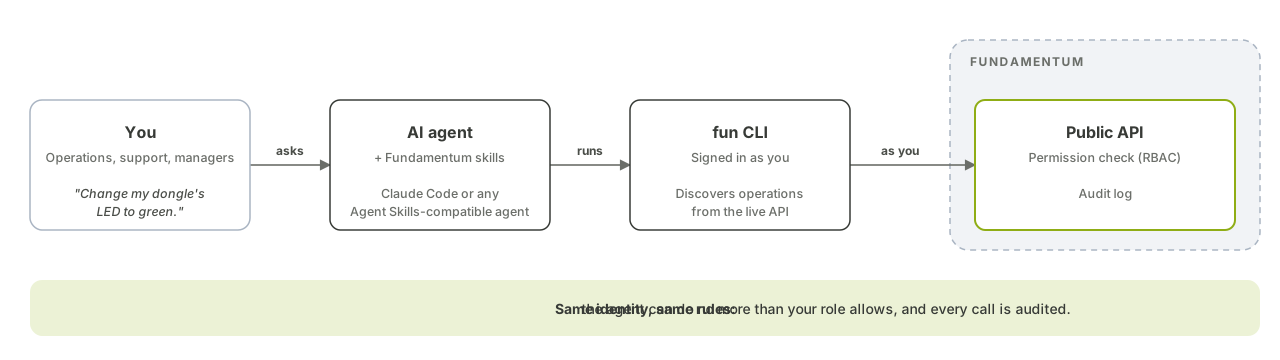
A skill is a folder of instructions and reference files that an AI coding agent loads when your request matches its description. The Fundamentum skills teach the agent how to use the fun CLI, which API to call for what, and which mistakes to avoid. The agent then runs fun commands in your terminal, with your context and your token. It acts as you: it can do exactly what your role allows, nothing more. See Roles and permissions.
Before you begin
- The
funCLI is installed and you are signed in. See The fun CLI. - You use an AI coding agent that supports skills and reads them from
~/.claude/skillsor~/.agents/skills.
1. Install the skills
The skills ship with the CLI. Install them with:
fun install-skills
The command copies the skills to ~/.claude/skills if ~/.claude exists, otherwise to ~/.agents/skills, and prints the directory it used. Run it again after you upgrade the CLI to get the latest version of the skills.
You get these skills:
| Skill | Lets you… |
|---|---|
fun-api |
Manage the whole cloud side through every Public API v1 and v2 operation: organizations, projects, users and invitations, service accounts and tokens, roles, licenses, registries, devices and device types, actions and commands, alerts, states and heartbeats, encoders, connectors, file transfers, functions and Insight. Also covers signing in and diagnosing 401 and 403 errors |
fun-api-refresh |
Refresh the cached OpenAPI specs behind fun api |
fun-api-device |
Get device-integration guidance for your firmware team: provisioning with the Devices API, device credentials, the Edge daemon and the MCU library |
atoms3-lite |
Explore and extend the AtomS3 Lite starter kit: its states, LED colours, colour and Wi-Fi actions, alerts, and building and flashing its firmware |
The skills hand work to each other: a cloud task that turns into a device task moves from fun-api to fun-api-device.
2. Refresh the API specs
The fun-api skill works through fun api, which needs the cached specs. Download them once:
fun api refresh
You can also ask the agent: "refresh the Fundamentum API specs".
3. Ask in plain language
Start your agent in a terminal where fun works, then ask. You don't need to name the CLI or the skill. For example:
- "List the devices of project 42 that haven't sent a heartbeat today."
- "Create a service account for our CI in project 42 and give it the read-only role."
- "Who can access project 42, and with which role?"
- "Set the LED of my AtomS3 dongle to blue."
- "How does my firmware provision itself against the Devices API?"
The agent discovers the right operation with fun api … --help instead of answering from memory, then runs it and returns the result.
Guardrails
The skills set rules that the agent follows:
- Tokens are never displayed. The agent never prints, echoes or writes a token or service-account token to a file, a repository or a log.
- Authorization errors are reported as they are. On a
401or403, the agent shows you the exact HTTP status and message. It never switches silently to another context to work around the error. - No guessed identifiers. The agent looks up project, registry and device IDs instead of inventing them, and checks each operation's help before calling it.
- The right API for the job. Cloud work goes through the Public API with your user or service-account token. Device credentials are never used against the Public API.
- Facts are qualified. For the starter kit, the agent says whether a result was observed on the device, only compiled, or not tested.
You stay responsible for what you approve. For write operations, ask the agent to run the command with --dry-run first and review the request.
What's next
- The fun CLI: the commands the agent runs for you.
- Quickstart: AtomS3 Lite: try the
atoms3-liteskill on the starter kit. - fun CLI reference and Public API reference.