Gateways and sub-devices
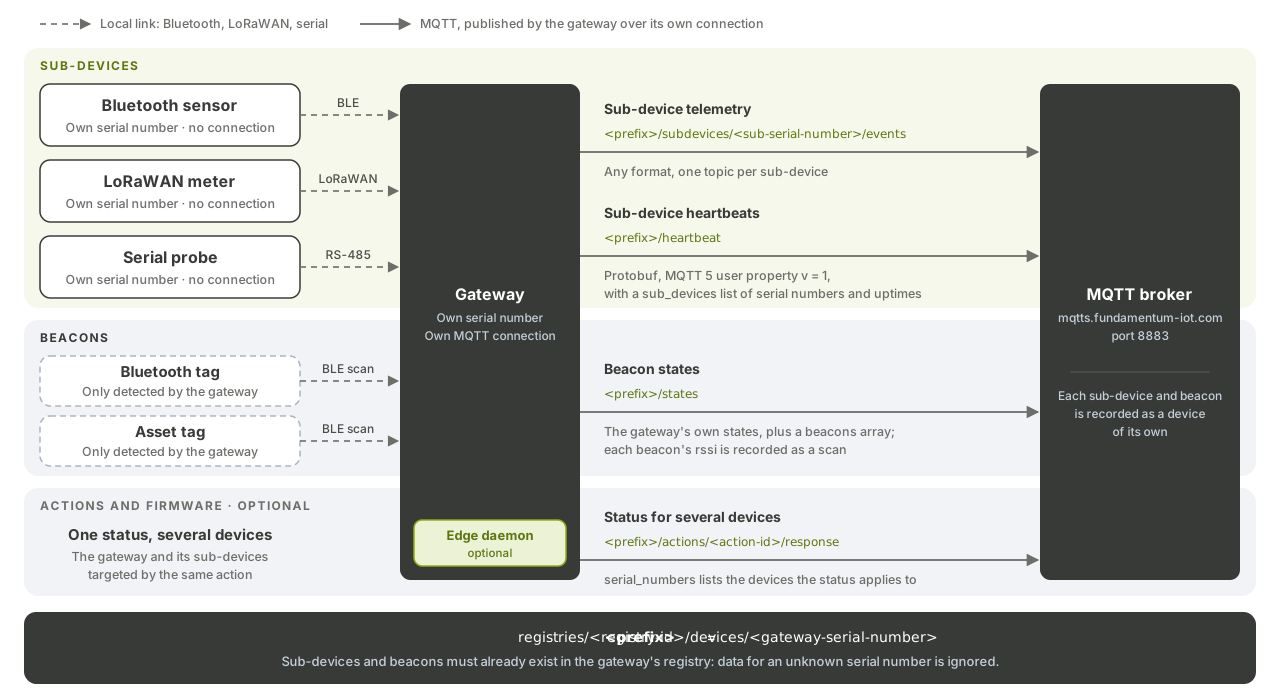
A gateway is a device that publishes on behalf of other devices: sub-devices that have their own serial number but no connection of their own, and beacons it detects nearby. This page shows you how a gateway reports telemetry, heartbeats and states for them.
Before you begin
- The gateway is provisioned and connected. See Connect over MQTTS.
- The gateway's device type is flagged as a gateway in the Hub, so it appears on the Gateways page.
- Each sub-device exists as a device in the same registry as the gateway. Telemetry for a serial number that isn't in that registry is dropped.
In the examples, <prefix> stands for the gateway's prefix, registries/<registry-id>/devices/<gateway-serial-number>.
| Data for | How the gateway reports it |
|---|---|
| Sub-device telemetry | Publish to <prefix>/subdevices/<sub-serial-number>/events, or .../events/<subtype> to route it like the device's own subtypes |
| Sub-device uptime | Heartbeat version 1 (protobuf), with a sub_devices list |
| Beacon states | beacons array inside the gateway's own states |
1. Send telemetry for a sub-device
Publish the sub-device's telemetry under the gateway's prefix. As for any telemetry, the format is free:
mosquitto_pub -V mqttv5 \
  -h mqtts.fundamentum-iot.com -p 8883 --cafile isrgrootx1.pem \
  -i "projects/<project-id>/regions/1/registries/<registry-id>/devices/<gateway-serial-number>" \
  -u unused -P "$JWT" \
  -t "registries/<registry-id>/devices/<gateway-serial-number>/subdevices/<sub-serial-number>/events" \
  -m '{"temperature": 19.8}'
events is the only topic allowed under subdevices/.
2. Report sub-device heartbeats
To report the uptime of the gateway and its sub-devices together, publish a protobuf Heartbeat message on <prefix>/heartbeat with the MQTT 5 user property v set to 1. The message carries a sub_devices list.
Without the v property, or with v set to 0, the heartbeat is the plain JSON {"uptime": <seconds>} of the gateway alone. See MQTT topics and message formats for the protobuf schema.
3. Report beacons
Beacons are small devices the gateway only detects, such as Bluetooth tags. Add them to the gateway's states, in the beacons array:
{
  "timestamp": 1789167823,
  "states": { "battery_level": 87 },
  "beacons": [
    {
      "identification": "beacon-abc123",
      "states": { "rssi": -67, "battery_level": 44 }
    }
  ]
}
Each beacon is a device of its own, identified by identification. The platform stores its states, and records its rssi as a scan by the gateway.
Use the Edge daemon on a gateway
The Linux daemon handles sub-devices for you:
| gRPC call | Use |
|---|---|
Heartbeat.AttachSubDevice, Heartbeat.Send |
Report sub-device heartbeats |
StatesEvent.PublishJson |
Publish states, with a sub_devices list |
Actions.UpdateStatus, FirmwareUpdate.UpdateStatus |
Report status for one or more devices, through serial_numbers |
What's next
- Actions and custom encoders and Firmware updates (OTA) for sub-devices.