Linux daemon
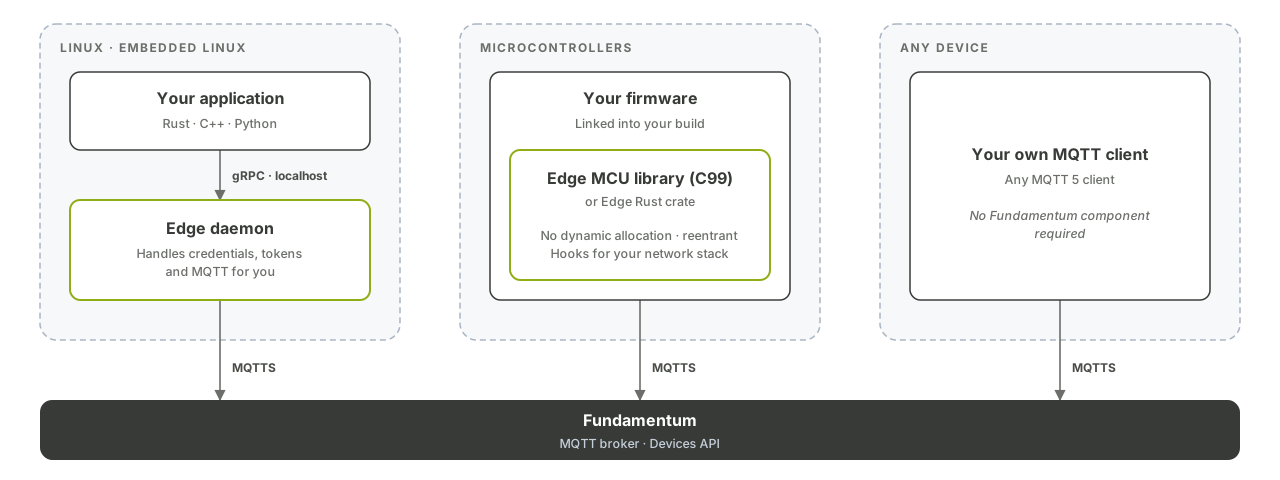
The Fundamentum Edge daemon is the ready-made way to connect a Linux device to Fundamentum, instead of writing your own MQTT client. It handles provisioning, keys, the MQTTS connection, heartbeats and reboots, and exposes everything else to your application over a local gRPC interface. This page shows you how to install it, provision the device and call its services.
Before you begin
- A Linux device with a Rust toolchain (1.88 or later),
protoc, and the OpenSSL development libraries. - The registry token file and the
asset_type_idfor your device. See Self-provisioning. grpcurlto try the gRPC calls from a shell.
1. Install the daemon
The daemon is published on crates.io as fundamentum-edge-daemon (Apache-2.0):
cargo install fundamentum-edge-daemon
This installs the fundamentum-edge binary.
On a Yocto Linux built with the meta-fundamentum layer, the daemon is already included and listens on the Unix socket /run/fundamentum-edge/grpc.socket.
2. Start the daemon
fundamentum-edge --config /etc/fundamentum-edge/config.toml --state-dir /var/lib/fundamentum-edge
Without options, the daemon uses ./config.toml (created with default values if it doesn't exist), stores its state in the current directory, and serves gRPC on 127.0.0.1:8080. Run it under your init system (for example, a systemd service) so it starts at boot.
| Option | Effect |
|---|---|
-c, --config <path> |
Configuration file |
-s, --state-dir <path> |
Directory for the provisioning state and keys |
--grpc-tcp <addr> |
Serve gRPC on a TCP address |
--grpc-uds <path> |
Serve gRPC on a Unix socket |
--heartbeat, --no-heartbeat |
Turn automatic heartbeats on or off |
--heartbeat-interval <minutes> |
Heartbeat interval |
--pfwd, --no-pfwd |
Turn port forwarding on or off |
-v |
Increase log verbosity |
Run fundamentum-edge --help for the full list. After an upgrade, fundamentum-edge update-config adds any new fields to your configuration file.
3. Configure it
The main settings in config.toml, with their defaults:
| Key | Default | Description |
|---|---|---|
state_dir |
Current directory | Where state files are kept |
[grpc.server] socket |
TCP 127.0.0.1:8080 |
TCP address or Unix socket |
[grpc.services.provisioning] default_api_base_url |
https://devices.fundamentum-iot.com |
Devices API used for provisioning |
[heartbeat] enabled |
true |
Automatic heartbeats |
[heartbeat] interval_min |
15 |
Heartbeat interval, in minutes (decimals allowed) |
[reboot] enabled |
true |
Handle the reboot command |
[pfwd] enabled |
false |
Port forwarding; see Port-forwarding agent |
[mqtt] keep_alive_sec |
60 |
MQTT keep-alive |
[mqtt] session_expiry_interval_sec |
300 |
MQTT session expiry |
For example, to serve gRPC on a Unix socket:
[grpc.server]
socket = { uds = "/run/fundamentum-edge/grpc.socket" }
4. Provision the device
Until the device is provisioned, Provisioning.Provision is the only gRPC call that works. Use the values from the token file:
grpcurl -plaintext -d '{
    "api_base_url": "https://devices.fundamentum-iot.com",
    "project_id": <project-id>,
    "region_id": 1,
    "registry_id": <registry-id>,
    "serial_number": "<serial-number>",
    "asset_type_id": <asset-type-id>,
    "access_token": "<registry-provisioning-token>"
  }' \
  127.0.0.1:8080 com.fundamentum.edge.v1.Provisioning.Provision
The daemon generates the key pair, registers the device, and writes provisioning.json, rsa_public.pem and rsa_private.pem to the state directory. It then connects over MQTTS on its own.
Over a Unix socket, replace the address with the socket path:
grpcurl -unix -authority localhost -plaintext -d '{}' \
  /run/fundamentum-edge/grpc.socket com.fundamentum.edge.v1.Configuration.Get
5. Call the services from your application
All services live in the com.fundamentum.edge.v1 package. The server also supports gRPC reflection and health checks.
| Service | Calls | Use |
|---|---|---|
Telemetry |
Publish |
Send telemetry (sub_topic, qos, base64 payload) |
StatesEvent |
PublishJson |
Send states, optionally for sub_devices |
Heartbeat |
Send, AttachSubDevice |
Send a heartbeat now, or attach a sub-device to the next one |
Configuration |
Get, UpdateStream |
Read the device configuration and follow its changes |
Actions |
Subscribe, UpdateStatus |
Receive actions and report their status |
FirmwareUpdate |
Subscribe, UpdateStatus |
Receive firmware updates and report progress |
FileTransfer |
Subscribe, DownloadFile, UploadFile, UpdatePreStatus, UpdatePostStatus |
File transfers |
For example, to publish telemetry to the test sub-topic:
grpcurl -plaintext -d '{"sub_topic": "test", "qos": 0, "payload": "SGVsbG8sIFdvcmxkIQ=="}' \
  127.0.0.1:8080 com.fundamentum.edge.v1.Telemetry.Publish
The daemon handles the reboot command itself.
Language bindings
Generated bindings are published as fundamentum-edge-proto:
| Language | Package |
|---|---|
| Rust | fundamentum-edge-proto on crates.io |
| Python | fundamentum-edge-proto on PyPI |
For other languages, generate client stubs from the .proto files with protoc.
What's next
- Gateways and sub-devices to report for sub-devices through the daemon.
- Port-forwarding agent to turn on remote access.
- Send telemetry, states and heartbeats for what the daemon sends on your behalf.