Provisioning
Provisioning registers a device in a registry and stores the public key it signs in with. This page helps you choose the provisioning method that fits your manufacturing and deployment flow.
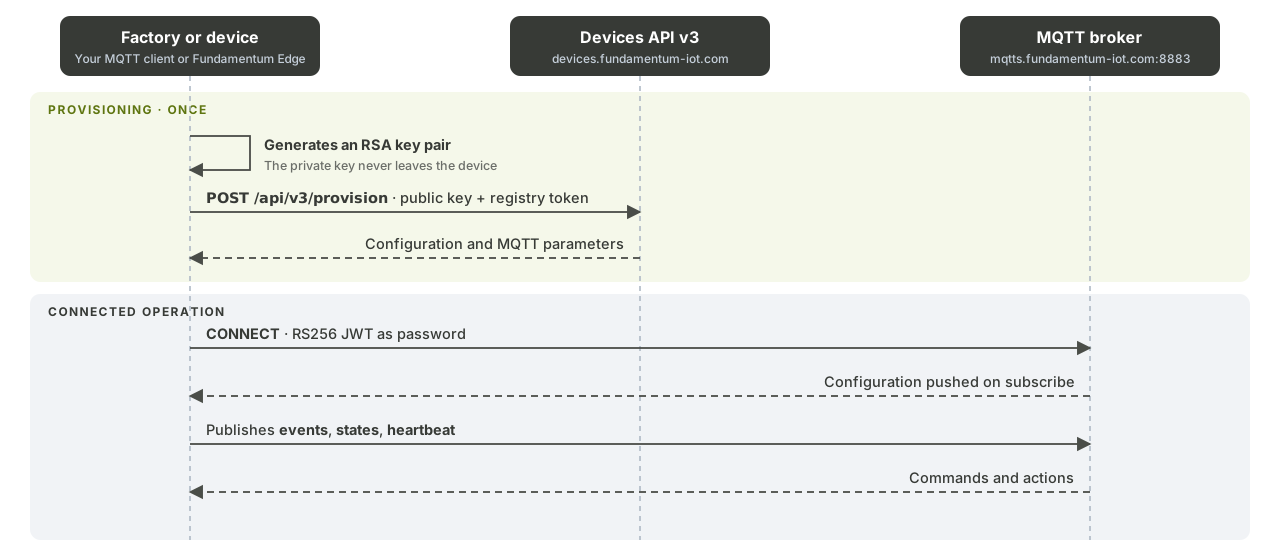
What provisioning does
Each provisioned device has:
- a serial number that is unique within its registry. Serial numbers use lowercase letters, digits,
-and_, and the platform lowercases them; - an asset type (for example, IoT Device);
- a credential, usually an RSA public key (
RS256), whose private key never leaves the device.
Once a device is provisioned, it signs a short-lived JWT with its private key and uses that JWT to connect over MQTTS or to send telemetry over HTTPS.
Choose a method
| Method | Who registers the device | Credential used to register | Use it when |
|---|---|---|---|
| Self-provisioning | The device itself, at first boot | The registry's provisioning token (from the token file) | You know the destination registry when you flash or install the device. |
| Shelf devices | Your factory tooling, then an installer or integration | A project provisioning key | You build devices before you know which customer or registry they go to. |
| LoRaWAN | You, in the Hub or through the API, before the device joins | The device's AppKey | Your devices use LoRaWAN and join through a network server. |
Registry gates
A registry controls who can join it:
- a provisioning window (start and end dates). Devices can only be provisioned while the window is open;
- a device limit per device type. Re-provisioning a device that already exists doesn't consume the limit.
Set both on the registry in the Hub before you provision devices.
What's next
- Generate a key pair and follow Self-provisioning for the simplest path.
- Read Core concepts for projects, registries and device types.
- See the Devices API v3 reference for every provisioning endpoint.