Connect: access and customers
These guides show you how to organize who sees and does what on Fundamentum, in Connect: structure your customers as licenses, and give people and machines the right roles.
For a product-level overview, see Govern access.
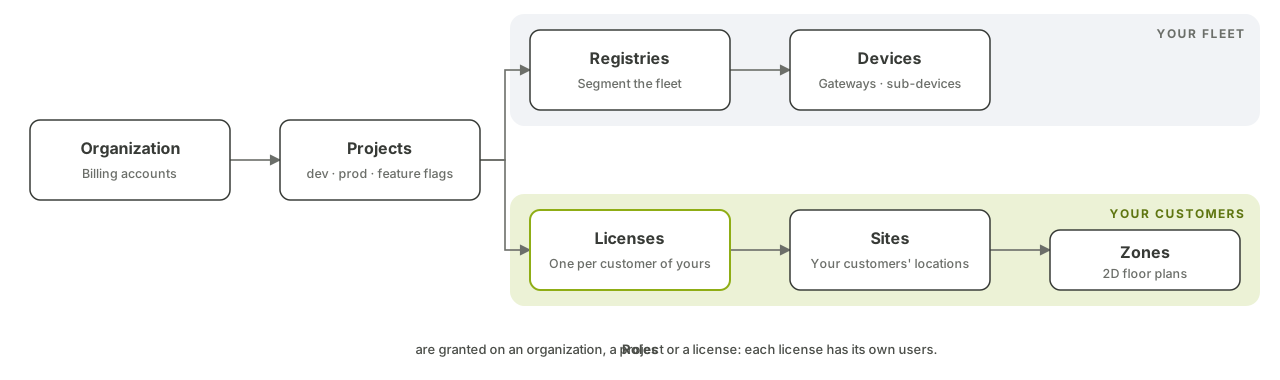
The hierarchy
| Level | What it is | Managed in |
|---|---|---|
| Organization | Your company, the top of the hierarchy. Holds your projects and billing accounts | Connect |
| Project | The unit of isolation, typically one for development and one for production. Almost every resource and most roles belong to a project | Connect |
| Registry | A segment of your fleet inside a project | Hub, Public API |
| Device | A piece of hardware, a gateway or a sub-device | Hub, Public API |
| License | One of your customers. Carries its own users, its own options and its own sites | Connect, Public API |
| Site | A location of that customer, such as a building or a parking lot | Connect |
| Zone | A subdivision of a site, such as a floor or a room, with its own 2D plan | Connect |
The left side of the diagram is your fleet; the right side is your customers. A license lets someone work on what belongs to one customer and nothing else.
Before you begin
-
You have a Fundamentum account and access to Connect, the console where you manage organizations, projects, users and licenses.
-
You can call the Public API, or you have the
funCLI logged in. See Authentication. -
You know your
<project-id>. To see who you are and what roles you hold:fun api v2 users introspect-user
Guides
| You want to… | Guide |
|---|---|
| Give each of your customers their own space, users and sites | Licenses: serve your own customers |
| Invite people, assign roles, create service accounts for automation | Roles and permissions |
A typical setup
Say you sell connected parking sensors, and each of your customers runs several parking lots:
- Your organization has a development and a production project. Your own team gets
project_managerordevices_managerthere. See Roles and permissions. - You define a license type
Parkingwith the options you sell, such ascapacity, then create one license per customer. See Licenses. - Under each license, you add the customer's sites (their parking lots) and invite their staff as
license_managerorlicense_viewer. They see their own sites and nothing else. - You create alert rules on the states your sensors report, and notify the right role by email and in-app. See Alerts.
- Your CI pipeline uses a service account with the narrowest role it needs, never a personal account.
Good practices
- Grant roles at the lowest level that works: a site rather than a license, a license rather than the project.
- Prefer notifying roles rather than individual users, so alerts follow people as they join or leave.
- Review pending invitations and service account tokens regularly, and delete the ones you no longer need.