Inbound flows
Inbound flows bring messages from your systems into a project topic, for example to send commands to devices or to feed reference data to Insight. This page shows you the two ways in: your MQTT broker publishes into the platform, or your systems POST messages over HTTPS through the Public API.
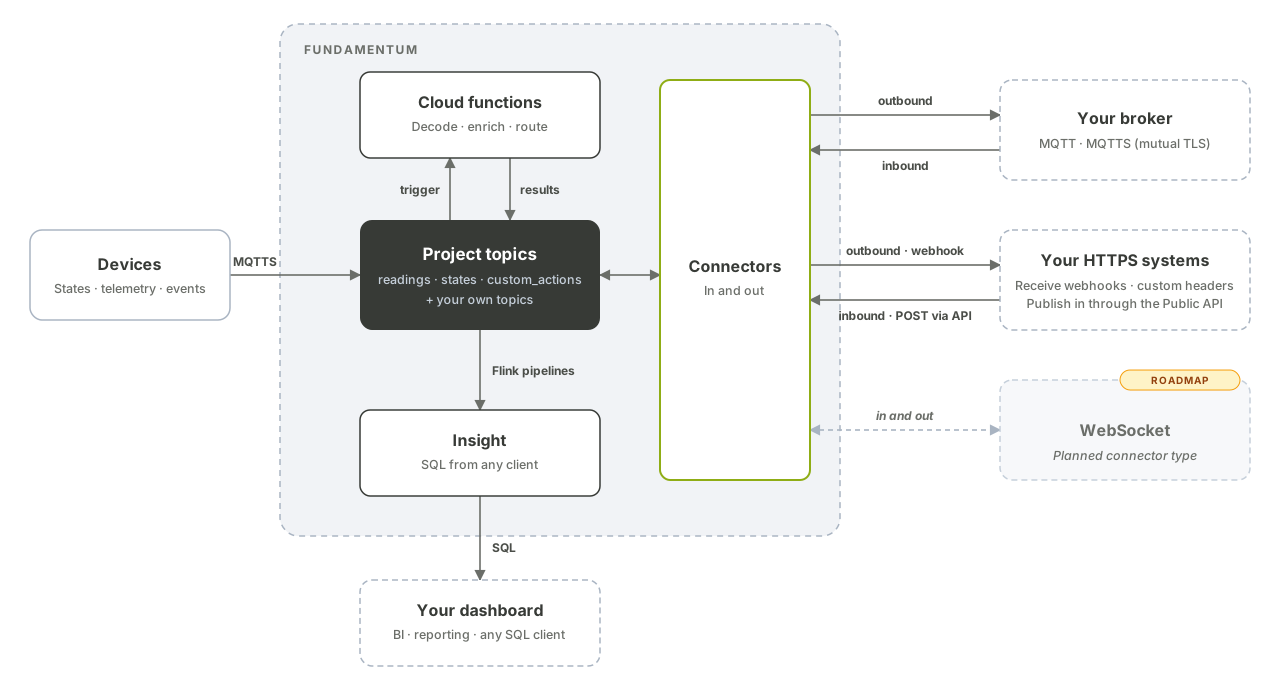
How inbound flows work
Both flows use a connector with an ingoing link ("ingoing": true). The link points to a project topic of type custom_actions, dimension or fact:
- From your MQTT broker: Fundamentum subscribes to the link's
external_topic_nameon your broker and copies every message to the topic. Use an MQTT or MQTTS connector. - Over HTTPS: your systems call the Public API, which publishes the request body to the topic. Use an HTTPS connector.
Messages on a custom_actions topic are forwarded to the targeted device on registries/<registry-id>/devices/<serial-number>/custom_actions (see MQTT topics and message formats).
Message format
Both flows take the same JSON message:
{
  "device_id": 1234,
  "registry_id": 56,
  "version": "1.0.0",
  "headers": {"trace-id": "abc"},
  "data": "hello"
}
| Field | Type | Description |
|---|---|---|
device_id |
integer | Target device ID. Required and non-zero for custom_actions topics, otherwise the message is dropped. Optional for other topic types. |
registry_id |
integer | Registry of the target device. Same rules as device_id. |
version |
string | Optional version, passed along as a header. |
headers |
object of strings | Optional extra headers. On a name conflict, the value in headers wins. |
data |
string | The message body delivered on the topic. |
device_id, registry_id and version become message headers; a missing or 0 ID is left out.
Before you begin
- The
funCLI installed and signed in (see Authentication). - Your project ID and the ID of the target topic (
fun api v1 pub-sub list-pub-sub-topics --project-id <project-id>). - For
custom_actions: the device ID and registry ID of the target device.
Publish from your MQTT broker
-
Create an MQTT or MQTTS connector to your broker, as described in Connectors.
-
Create an ingoing link.
external_topic_nameis the topic Fundamentum subscribes to on your broker; it cannot also be used by an outgoing link of the same connector.fun api v1 pub-sub store-link --project-id <project-id> --connector-id <connector-id> \ --body '{"pubsub_topic_id": <topic-id>, "external_topic_name": "plant/commands", "ingoing": true}' -
Publish the message on your broker, for example with Mosquitto:
mosquitto_pub -h mqtt.example.com -p 8883 --cafile ca.pem --cert client.pem --key client.key \
  -t plant/commands \
  -m '{"device_id": <device-id>, "registry_id": <registry-id>, "data": "{\"led\":\"on\"}"}'
POST over HTTPS
-
Create an HTTPS connector. For inbound use, it only needs to be enabled; its
hostand custom header apply to outgoing links.fun api v1 pub-sub store-connector --project-id <project-id> --body '{ "name": "erp-inbound", "adapter_type": 3, "is_enabled": true, "connection_string": "host=https://erp.example.com" }' -
Create an ingoing link to the target topic.
external_topic_nameis not used by HTTPS ingoing links.fun api v1 pub-sub store-link --project-id <project-id> --connector-id <connector-id> \ --body '{"pubsub_topic_id": <topic-id>, "external_topic_name": "erp-commands", "ingoing": true}'Note the link
idin the response. -
Publish a message:
fun api v1 pub-sub publish-to-link --project-id <project-id> --connector-id <connector-id> --link-id <link-id> \
  --body '{"device_id": <device-id>, "registry_id": <registry-id>, "data": "{\"led\":\"on\"}"}'
The raw request, which any HTTP client can send with a bearer token:
POST https://api.fundamentum-iot.com/v1/projects/<project-id>/connectors/<connector-id>/links/<link-id>/publish
Authorization: Bearer $TOKEN
Content-Type: application/json

{"device_id": 1234, "registry_id": 56, "data": "{\"led\":\"on\"}"}
A successful call returns:
{"status": "success"}The API answers
422if the connector is not an enabled HTTPS connector or if the link is not ingoing.
What's next
- API reference in Swagger UI: PubSub
- Actions and custom encoders: send structured, tracked commands to devices instead of raw messages.
- Cloud functions: process the messages your systems send before they reach devices or other topics.
- Public API reference: full schema of the publish endpoint.