MCU library
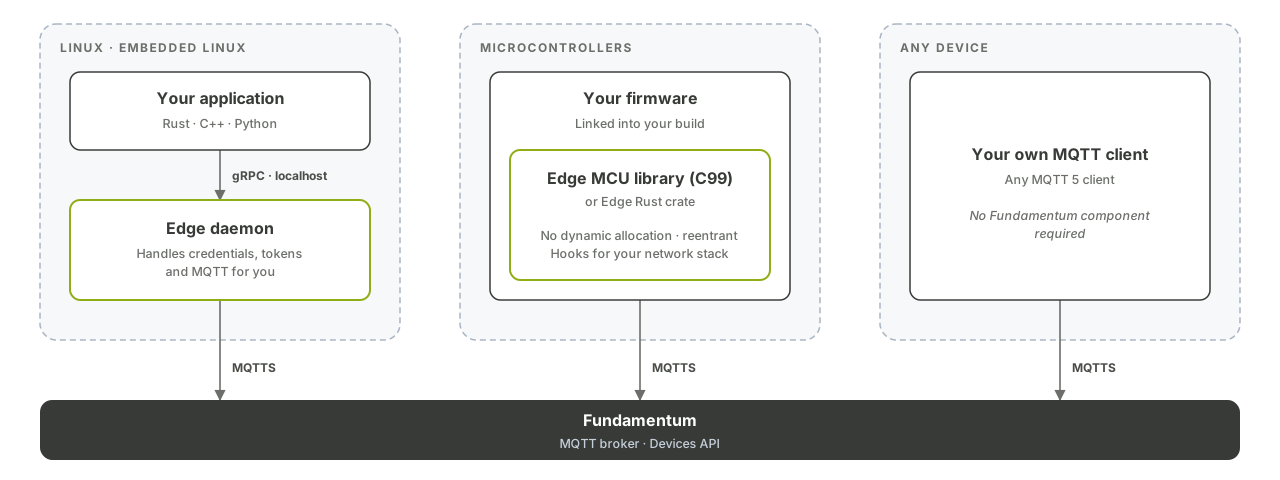
Fundamentum Edge MCU C is a portable C library that connects microcontroller devices to Fundamentum. You plug in your own HTTP, MQTT, crypto and clock code through hooks, and the library takes care of the Fundamentum protocol. This page shows you how to add it to your firmware and run the basic workflow.
What you get
- C99, with no compiler extensions.
- No dynamic allocation: the library works inside a buffer you provide.
- Multiple independent, reentrant contexts, for RTOS tasks or threads.
- Apache-2.0 license. Bundled dependencies: coreJSON (MIT) and nanopb (Zlib).
| Feature | Description | Opt-out macro in include/fundamentum_edge/config.h |
|---|---|---|
| Provisioning | Look up the registry of a shelf device | EDGE_CFG__USE_PROVISIONING |
| Actions | Receive and answer actions | EDGE_CFG__USE_ACTIONS |
| Firmware update | Receive firmware update requests | EDGE_CFG__USE_FIRMWARE_UPDATE |
| Heartbeat | Report device health | EDGE_CFG__USE_HEARTBEAT |
| States | Publish device states | EDGE_CFG__USE_STATES |
| Telemetry | Publish telemetry | EDGE_CFG__USE_TELEMETRY |
Before you begin
- A C99 compiler, CMake and just to build the library.
- An HTTP client (only if you use provisioning), an MQTT client with TLS, SHA-256 hashing and RSA signing on your platform.
- A provisioned device and its private key. See Provisioning.
1. Add the library to your firmware
Pick one integration method:
| Method | How |
|---|---|
| Git submodule | git submodule add git@bitbucket.org:amotus/fundamentum-edge-mcu-c.git vendor/fundamentum-edge-mcu-c, then add the sources to your build |
| Copy the sources | Copy src/, include/ and vendor/ into your project |
| Static library | Run just build-release and link build/Release/libfundamentum-edge-mcu-c.a |
2. Implement the hooks
Hooks are the functions the library calls on your platform. Implement the ones your enabled features need:
| Hook | Required when |
|---|---|
edge_hook_time_get |
Always (current Unix time) |
edge_hook_crypto_hash_buffer |
Always (SHA-256) |
edge_hook_crypto_sign_digest |
Always (RS256 signature for the JWT) |
edge_hook_mqtt_publish_message |
Always |
edge_hook_http_send_request |
Provisioning is enabled |
edge_hook_action_handle_incoming_request |
Actions are enabled |
edge_hook_firmware_update_handle_incoming_request |
Firmware update is enabled |
edge_hook_log_handler |
EDGE_CFG__LOG_LEVEL is above EDGE_LOG_LEVEL__NONE |
In the other direction, pass every MQTT message your client receives to the library with edge_feed_mqtt_message.
3. Run the workflow
#include <fundamentum_edge.h>
edge_ctx_t *ctx = NULL;
uint8_t edge_buffer[EDGE_CTX_BUFFER_SIZE_HINT] = {0};
my_hook_ctx_t hook_ctx = {my_http_client, my_mqtt_client};
edge_error_t err = edge_ctx_init(&ctx, edge_buffer, sizeof(edge_buffer), &hook_ctx);
// Shelf devices only: ask which registry the device was provisioned into.
err = edge_provisioning_get_registration(ctx, &identity, ®istration);
edge_device_t device = {
.serial_number = "<serial-number>",
.asset_type_id = <asset-type-id>,
.project_id = <project-id>,
.region_id = 1,
.registry_id = <registry-id>, // or registration.registry_id
};
// Fills the MQTT client ID, username and password (the device JWT).
err = edge_mqtt_credentials_get(ctx, &device, private_key, &credentials);
// Connect your MQTT client, then subscribe to every Fundamentum topic.
for (edge_mqtt_topic_sub_type_t t = 0; t < EDGE_MQTT_TOPIC_SUB_TYPE__COUNT; t++) {
char topic[128] = {0};
edge_mqtt_topic_sub_build(t, &device, topic, sizeof(topic));
mqtt_subscribe(my_mqtt_client, topic, MQTT_QOS_1);
}
err = edge_send_heartbeat(ctx, &device, uptime);
err = edge_send_telemetry(ctx, &device, sub_topic, &telemetry);
err = edge_send_states(ctx, &device, &states);
Connect your MQTT client to the broker returned by edge_provisioning_get_registration, or to mqtts.fundamentum-iot.com:8883. See Connect over MQTTS for the TLS requirements (SNI and CA).
4. Start from an example
The repository includes complete hook implementations:
| Example | Platform |
|---|---|
examples/Linux |
Linux, with libcurl (HTTP) and paho-mqtt-c (MQTT) |
examples/FreeRTOS |
FreeRTOS |
What's next
- Send telemetry, states and heartbeats to understand what the library publishes.
- Actions and custom encoders and Firmware updates (OTA).